The short answer
To create Meta lead ads, choose the Leads objective in Ads Manager, set the conversion location to Instant forms, and build a form with the Higher intent type, 2–4 qualifying questions, your privacy policy link and a clear thank-you screen. Connect the form to your CRM or download leads daily, call every lead within 5 minutes, and judge results on qualified leads, not cost per form.
Before you start
By the end of this SOP
A live lead ad with a Higher intent form, leads flowing into your CRM or sheet, and a 5-minute follow-up routine.
- Time
- 45–60 minutes
- You’ll need
- A Meta ad account and Facebook Page (SOP 010), a privacy policy page on your website, and someone ready to call leads.
- Who does this
- The Meta Ads manager, with the sales or front-desk team who will call leads.
About this SOP: why it matters, where and when
Why it matters: Forms that open inside Facebook and Instagram convert far better than sending people to a slow website, which means lower cost per lead, if you filter out low-quality submissions.
Where: Meta Ads Manager, the Page’s Instant Forms library, and Meta Business Suite → Leads Center or your CRM.
When: For services, courses, real estate, clinics and any business that closes sales on the phone or WhatsApp.
Stage 1
Set up the campaign
- 1
In Ads Manager, click + Create and choose the Leads objective. Name it using your naming convention (SOP 073).
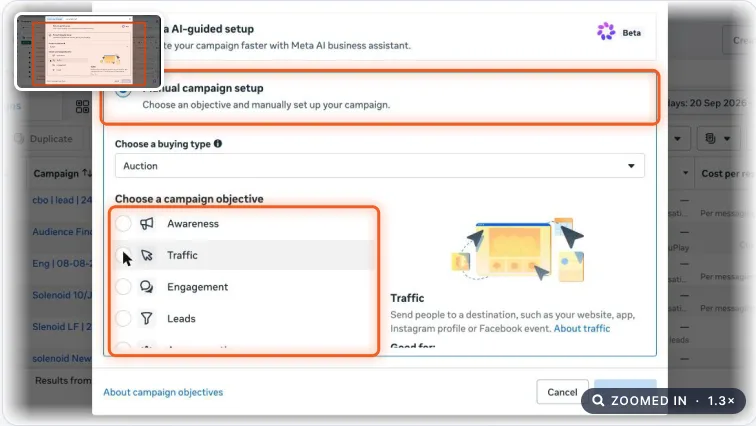
Meta Ads campaign objective choices. Real screenshot, Oct 2026. - 2
At ad set level, set Conversion location to Instant forms and the performance goal to Maximise number of leads.
- 3
Targeting: location (for example Kochi + 25 km), age range, and broad or Advantage+ audience. Let the form questions do the filtering (SOP 074).
- 4
Budget: at least 5–7× your target cost per lead per day, so the ad set can exit the learning phase.
Stage 2
Build a form that filters
Every extra step lowers volume and raises quality. Choose the balance on purpose.
- 1
At ad level, under Instant form, click Create form. Choose Higher intent: people review their details before submitting, which cuts accidental submissions.
- 2
Intro: a headline with the offer and one line on what happens next, for example “Get the fee details and next batch dates on WhatsApp.”
- 3
Questions: name and phone (pre-filled), then 2–3 qualifying questions with multiple-choice answers:
- “When do you want to start?” (This month / In 1–3 months / Just exploring).
- “Which course?” or “Which service?”.
- “Which city are you in?” for local businesses.
- 4
Privacy policy: link your website’s privacy page. Add a custom disclaimer if you will contact people on WhatsApp.
- 5
Thank-you screen: say when you will call, and add a button to WhatsApp or your website.
- 6
Publish the form. Forms can’t be edited after publishing; duplicate it to make changes.
Tip
Name forms with the date and version (Form – DM course – v2 – Oct26) so you can compare them later.
Stage 3
Get leads to the team instantly
- 1
Connect the form to your CRM: in Meta Business Suite, open All tools → Instant Forms → Lead integration → Connect CRM. Zoho CRM, HubSpot and many others are listed (SOP 330).
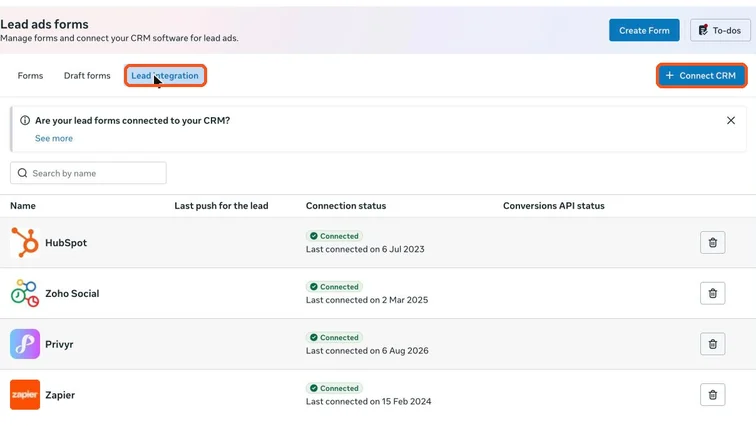
Meta Business Suite Lead ads forms, Lead integration tab with connected CRMs and the Connect CRM button. Real screenshot, Oct 2026. - 2
If you don’t have a CRM yet, download leads from the Forms tab (Download button) at least twice a day. Leads stay downloadable for 90 days.
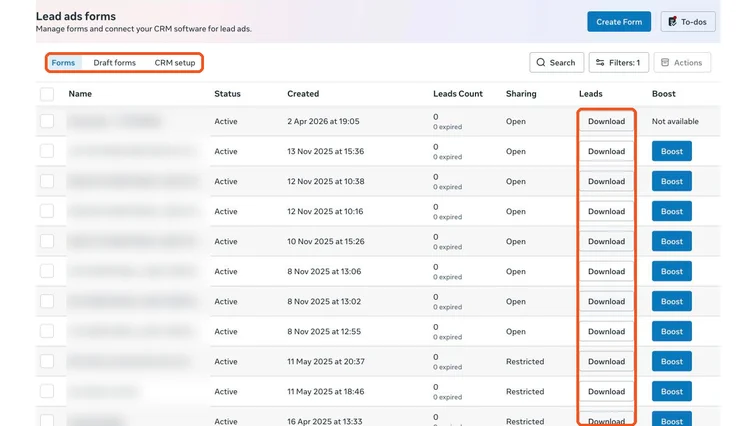
Lead ads forms list with a Download button for each form. Real screenshot, Oct 2026. - 3
Set a rule: call every lead within 5 minutes during working hours. Leads called after an hour answer far less often.
- 4
Log the outcome of every lead (answered, qualified, visited, enrolled) in the CRM so you can measure quality, not just cost per lead.
Stage 4
Judge on qualified leads
- 1
Weekly, compare platform leads in Ads Manager with leads in the CRM (duplicates and fake numbers drop out).
- 2
Calculate real CPL (spend × 1.18 ÷ valid leads) and cost per qualified lead. A cheap form with 20% answered calls is usually more expensive than it looks.
- 3
If quality is low, add a qualifying question, switch to Higher intent, or send people to a landing page instead.
- 4
Once 200+ leads have outcomes in the CRM, set up Conversion leads optimisation through the Conversions API so Meta finds people like your real customers.
Practice & check
Now do it for real
Reading is not doing. Open your own account and complete this task before you move on.
Practice task (5 min)
Build (without publishing) a Higher intent form for a sample coaching centre with three qualifying questions, a privacy link and a thank-you screen with a WhatsApp button.
Prove it
Two questions. Get both right and this SOP is done.
Common questions
Are Facebook lead ads good quality?
They can be, with a Higher intent form, qualifying questions and fast follow-up. Low quality usually comes from very short forms and slow calls.
Where do I find leads from Facebook lead ads?
In Meta Business Suite → Leads Center, in the Page’s Forms library, or in your CRM if connected. Download them at least daily if you don’t use a CRM.
Can I edit an Instant Form after publishing?
No. Duplicate the form, make changes and attach the new version to the ad.
Done. That’s a real skill, not a certificate.
Next: SOP 326 — Set Up the Meta Conversions API (CAPI) Without a Developer →
Want to do this on real client budgets, with a mentor checking your work? That’s Level 2 at Unlearn. See the Digital Marketing track