The short answer
To set up a Meta Ads account, create a business portfolio at business.facebook.com, then open Settings → Accounts → Ad accounts, click “+ Add” and choose “Create a new ad account”. Pick currency (INR) and time zone carefully, because changing them later means a new ad account. Add a payment method, turn on two-factor login and add a second admin.
Before you start
By the end of this SOP
A business portfolio that holds all your Meta assets, plus an ad account with a payment method.
- Time
- 10–15 minutes
- You’ll need
- A personal Facebook account.
- Who does this
- The business owner, or the person running paid ads for them.
About this SOP: why it matters, where and when
Why it matters: Manage Pages and ad accounts in one place and give people safe, role-based access instead of sharing passwords.
Where: Meta Business Suite (business.facebook.com).
When: The first time you set up Meta advertising for a business.
Stage 1
Create your Meta Business Suite account
Meta calls this a “business portfolio”. It is the home for your Pages, ad accounts and team.
- 1
Go to business.facebook.com and log in with your personal Facebook account.
- No Facebook account? Create one first. Meta needs a real person behind every business.
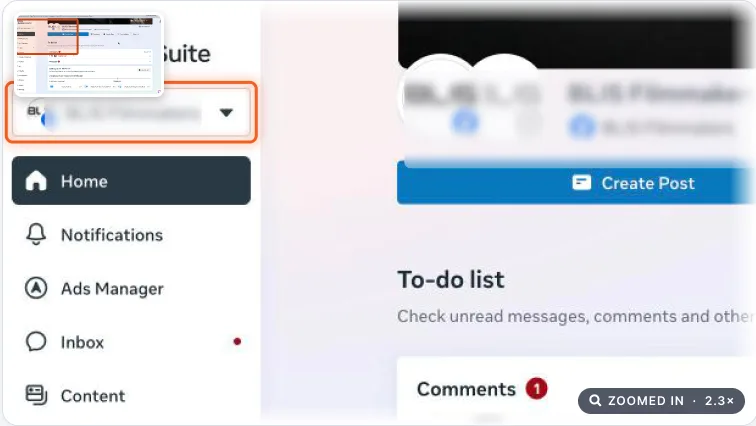
Meta Business Suite home with the business portfolio switcher highlighted. Real screenshot, Oct 2026. - 2
Open the portfolio switcher and click “Create a business portfolio”.
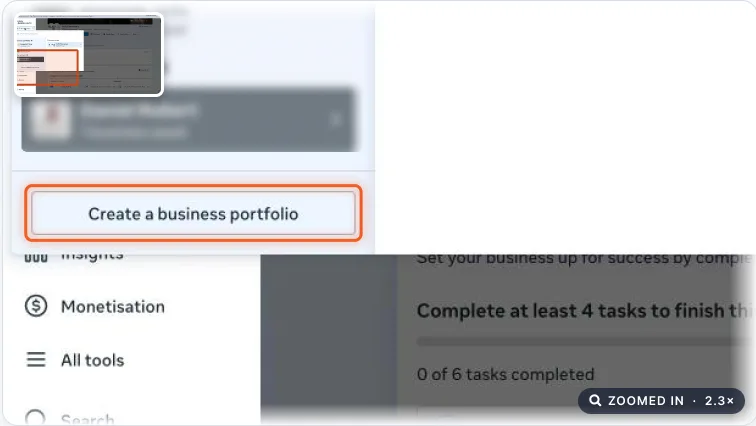
Portfolio switcher open with Create a business portfolio highlighted. Real screenshot, Oct 2026. - 3
Enter your business name, your name and your work email, then click Next / Create.
- 4
Open the confirmation email from Meta and click “Confirm now”.
Tip
Use a work email you check often. Meta sends security alerts and invites there.
Stage 2
Create a Meta ad account
Your ad account is where campaigns, budgets and billing live.
- 1
In Business Suite, click Settings (gear icon) → Accounts → Ad accounts.
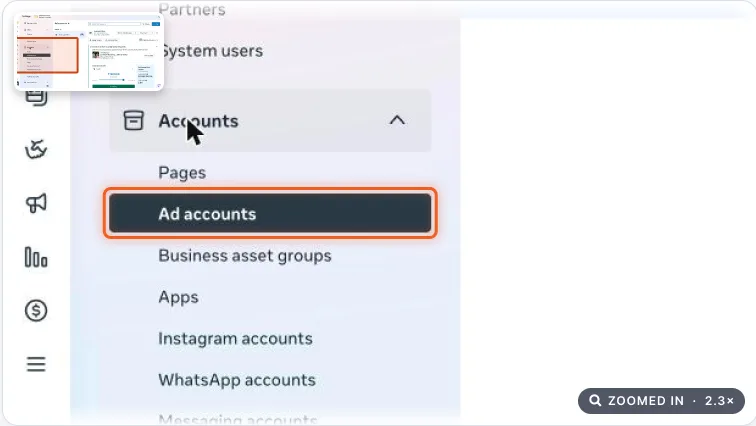
Business Suite settings with Ad accounts highlighted in the left menu. Real screenshot, Oct 2026. - 2
Click “+ Add” and choose “Create a new ad account”.
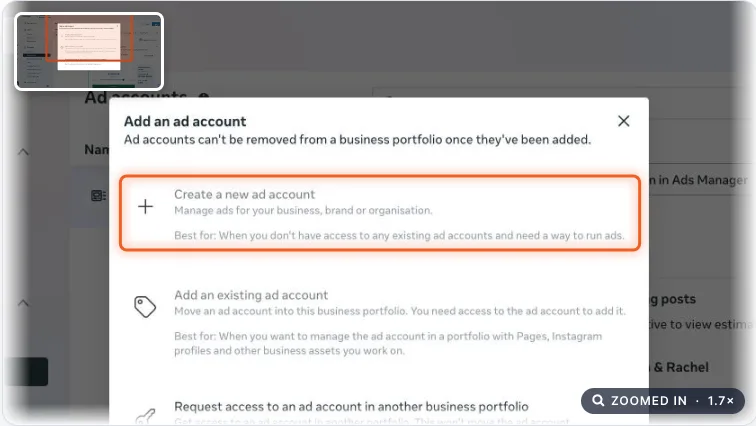
Add an ad account dialog with Create a new ad account highlighted. Real screenshot, Oct 2026. - 3
Enter the ad account name, time zone and currency, then click Next.
Watch out
Pick your currency and time zone carefully. Meta’s “change currency or time zone” option doesn’t edit this account; it creates a new one and makes the old one read-only, so you rebuild every campaign.
- 4
Choose whether the account is for your own business or another business, then click Next.
- 5
Tick the box to accept Meta’s terms and click “Create ad account”.
Stage 3
Add and check your payment method
Ads will not run until a payment method is added.
- 1
After creating the account, click “Add payment info”. Confirm country, currency and time zone, then click Next.
- 2
Add tax details if you have them, choose your payment method and click Next. Add your business address and Save.
- GST: Meta adds 18% GST on top of your ad spend in India. A registered business should enter its GSTIN so it can claim that GST back. Budget for it: ₹10,000 of ads costs about ₹11,800.
- Cards: Indian card rules (RBI e-mandates) often make automatic card charges fail. Many advertisers prepay with UPI or net banking instead (“Add funds”).
- 3
To check later: open Billing & payments and go to “Payment methods”.
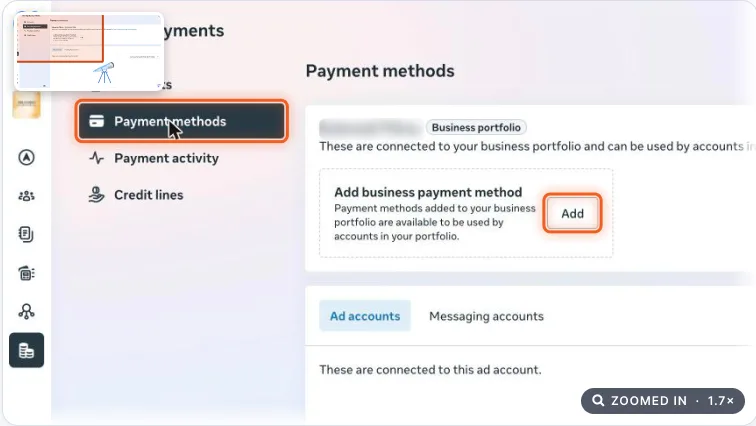
Billing and payments page with Payment methods and the Add button highlighted. Real screenshot, Oct 2026. Note
If the list is empty, click “Add” and enter the payment method again.
Stage 4
Share access with your team
Never share your Facebook password. Give people their own access instead.
- 1
Turn on two-factor authentication on your Facebook profile, then in Settings → Security Centre require it for everyone in the portfolio.
- 2
Add a second trusted admin with full control (a partner or senior staff member, not a freelancer).
Watch out
A portfolio with only one admin is the most common lockout we see. If that one profile is hacked or disabled, the business loses its ads and Pages.
- 3
To add an employee, freelancer or agency, follow SOP 062: Give your team access in Meta Business Suite.
- 4
Don’t create extra portfolios or ad accounts from new or fake profiles. Meta treats that as suspicious and can restrict everything linked to you.
Agency playbook
Doing this for a paying client
What a senior checks before calling the job done. Numbers are starting rules; compare them with the account’s own history.
What good looks like
- The client’s business portfolio owns the ad account, Page, Instagram and dataset (pixel). Your agency appears only as a Partner, never as owner.
- At least two client-side admins use two-factor login and a work email on the client’s domain, not a personal Gmail that nobody checks.
- The ad account name follows your convention, e.g. “clientname-IN-INR-main”, so nobody confuses it with old or test accounts.
- Billing is clean: GSTIN (GST identification number) entered, invoices in the client’s legal name, and prepaid funds covering about 2 weeks of spend (starting rule).
- An account spending limit equals the approved monthly budget plus 18% GST, so one wrong extra zero can’t overspend.
Mistakes we see on real accounts
- Creating the ad account inside the agency’s portfolio. When the client leaves, they lose all history and data, and blame you.
- Using a team member’s card “just to start”. GST invoices go in the wrong name and billing breaks when that person leaves.
- Choosing USD for a Kerala business. Every report needs converting, and fixing it means a new account and rebuilt campaigns.
- Leaving the time zone on US Pacific. Daily budgets reset around midday IST and day-wise reports never match the client’s CRM (customer relationship management system).
Agency checklist before you call it done
- The client, not you or your junior, owns the payment method. The business name matches their GST certificate.
- Screenshot ad account settings (ID, currency INR, time zone Asia/Kolkata) and save it in the client folder under Meta → Setup.
- Record the ad account ID, business portfolio ID and admin names in the client access sheet.
- Your agency is added as Partner with only the permissions you need (SOP 062).
- Account Quality in Business Support Home shows no restrictions on the portfolio or ad account.
- Change-log entry added: date, who created what, spending limit amount.
- Client confirmed currency, time zone and billing in writing before you build any campaign.
Handover message to the client
Hi [Client name], your Meta ad account “[clientname-IN-INR-main]” (ID [123456789]) is ready inside your own business portfolio. Currency INR, time zone India. Billing: [UPI prepaid], GSTIN added, spending limit ₹[35,400] (₹30,000 + 18% GST). You and [Second admin] are admins; we have Partner access only. Please reply “Approved” so we can start building.
Senior tip
Resist splitting one business into many ad accounts by product or branch. One account keeps data, audiences and learning together. Split only for a different currency, legal entity or market, like a Dubai branch in AED.
Practice & check
Now do it for real
Reading is not doing. Open your own account and complete this task before you move on.
Practice task (5 min)
Open business.facebook.com, open the portfolio switcher and find “Create a business portfolio”. Stop before creating anything.
Prove it
Two questions. Get both right and this SOP is done.
Common questions
Can I change my Meta ad account currency later?
Not on the same account. Meta’s change option creates a new ad account with the new currency or time zone and makes the old one read-only, so you have to rebuild your campaigns.
Does Meta charge GST on ads in India?
Yes, 18% GST is added on top of ad spend. Registered businesses can enter their GSTIN in payment settings and claim it back as input tax credit.
How many ad accounts can a new business portfolio have?
New portfolios often start with a limit of 1 ad account. The limit grows as you run ads and pay on time. Check it in Settings → Business info.
Is Meta Business Manager the same as Meta Business Suite?
Almost. “Business Manager” was the old name. Today the container that holds your Pages, ad accounts and people is called a business portfolio, and Meta Business Suite is the app you use to manage it.
Done. That’s a real skill, not a certificate.
Next: SOP 062 — Give Your Team Access in Meta Business Suite →
Want to do this on real client budgets, with a mentor checking your work? That’s Level 2 at Unlearn. See the Digital Marketing track