The short answer
To verify your domain in Meta Business Suite, open Settings → Brand safety → Domains, click “+ Add” → “Create a domain” and enter your domain. Choose the DNS TXT method, copy Meta’s code, add it as a TXT record at your domain registrar, then click “Verify domain”. DNS changes can take up to 72 hours.
Before you start
By the end of this SOP
Meta confirms you own your website.
- Time
- 5–10 minutes
- You’ll need
- A Business Suite (SOP 010) and login access to your domain registrar (GoDaddy, Cloudflare, Hostinger…).
- Who does this
- The person responsible for Meta ads.
About this SOP: why it matters, where and when
Why it matters: Verification proves you own your website, protects your links from being edited by others, and is still Meta best practice.
Where: Meta Business Suite and your domain registrar.
When: Before you run any Meta ad campaigns.
Stage 1
Add your domain in Business Suite
- 1
Go to business.facebook.com and choose the business you want to work on.
- 2
Open Settings (gear icon) → Brand safety → Domains.
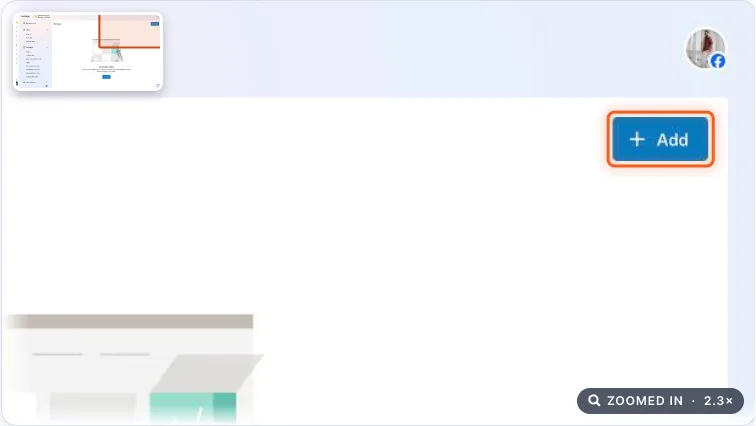
Domains settings page with the Add button highlighted. Real screenshot, Oct 2026. - 3
Click “+ Add” → “Create a domain”, type your domain (e.g. unlearnacademy.in) and click “Add”.
Stage 2
Verify with a DNS TXT record
This is the most reliable method and works for every registrar.
- 1
On the domain page, choose “Update the DNS TXT record with your domain registrar” and copy the TXT code Meta gives you.
- 2
Log in to your registrar and open the DNS settings (often under Domains → Manage → DNS).
- 3
Add a new record:
- Type: TXT
- Name/Host: leave blank or use @
- TTL: leave the default
- Value: paste the code from Meta
- 4
Save the record, go back to Business Suite and click “Verify domain”.
Note
DNS changes can take up to 48–72 hours. If it fails, try “Verify domain” again a day later.
Agency playbook
Doing this for a paying client
What a senior checks before calling the job done. Numbers are starting rules; compare them with the account’s own history.
What good looks like
- The domain shows “Verified” in the client’s own business portfolio, not in the agency’s.
- You verified the root domain (e.g. clinic.in), which also covers subdomains like book.clinic.in.
- Every domain used as an ad destination is verified, including landing-page builders running on a custom domain.
- The TXT record stays in DNS (domain name system) settings permanently. Deleting it later can undo verification.
Mistakes we see on real accounts
- Verifying in the agency’s portfolio. When the client moves on, they can’t verify their own domain until you remove it.
- Editing the SPF record instead of adding a new TXT record. The client’s emails start landing in spam.
- Typing https://www or a page path instead of the bare domain. Verification fails and days are lost waiting on DNS.
- Sending ads to a free subdomain like brand.wixsite.com. You can’t verify it, and the link looks less trustworthy to people.
Agency checklist before you call it done
- You know who controls DNS: client, web developer or hosting company. If you lack login, send them the exact record to add.
- You added a new TXT record and left existing ones (SPF email record, Google verification) untouched.
- Screenshot of the “Verified” status saved in the client folder.
- Change-log entry: domain, method, date, and who added the DNS record.
- The client’s web team knows to keep the record during site redesigns or hosting moves.
- Reminder set to recheck verification after any website migration or DNS provider change.
Handover message to the client
Hi [Client name], your website [brand.in] is now verified with Meta in your own business portfolio. We added one TXT record in your DNS at [GoDaddy]. Please ask your web team to keep it during any website changes.
Senior tip
Treat verification as one part of a trust setup: verified domain, the same business name on Page and website, clear contact details and a real privacy policy. Together they can reduce rejections and restrictions for new advertisers.
Practice & check
Now do it for real
Reading is not doing. Open your own account and complete this task before you move on.
Practice task (5 min)
Open Settings → Brand safety → Domains in your business portfolio and find the Add button.
Prove it
Two questions. Get both right and this SOP is done.
Common questions
Is domain verification still required for Meta conversion events?
No. Since 2025 Meta no longer requires it to configure conversion events, and the 8-event limit was removed. Verification is still recommended to prove ownership and protect your links.
Why did my Meta domain verification fail?
Usually the DNS record hasn’t propagated yet (it can take up to 72 hours), or the TXT value was pasted with extra spaces. Check the record and try again later.
Done. That’s a real skill, not a certificate.
Next: SOP 114 — Move Your Page and Ad Account into Business Suite →
Want to do this on real client budgets, with a mentor checking your work? That’s Level 2 at Unlearn. See the Digital Marketing track