The short answer
To audit a Meta Ads account, check five areas: structure (few ad sets, many creatives), tracking (Pixel plus Conversions API, events, UTMs), audiences (broad prospecting, warm exclusions), creative (variety, fatigue, quality ranking) and budget versus results checked in the CRM, not only in Ads Manager. Then write a pause, shift and scale plan.
Before you start
By the end of this SOP
You know what is working, what isn’t, and your next steps.
- Time
- 5–10 minutes per area
- You’ll need
- Access to the client’s Business Suite and ad account (SOP 062).
- Who does this
- The person responsible for media buying.
About this SOP: why it matters, where and when
Why it matters: You learn the account’s history, spot quick wins and build a better strategy.
Where: Meta Business Suite and Ads Manager.
When: After onboarding a client, or as a free audit in a sales proposal.
Stage 1
Review account structure and names
- 1
Check the structure: one ad account per brand, one campaign per objective or offer, as few ad sets as possible, and 4–8 different creatives per ad set (SOP 069).
- 2
Look for ad sets stuck at “Learning limited” in the Delivery column. Usually there are too many small ad sets sharing too little budget. Recommend merging them.
- 3
Check the names. Can you tell the objective, audience and message just from the name? (SOP 073)
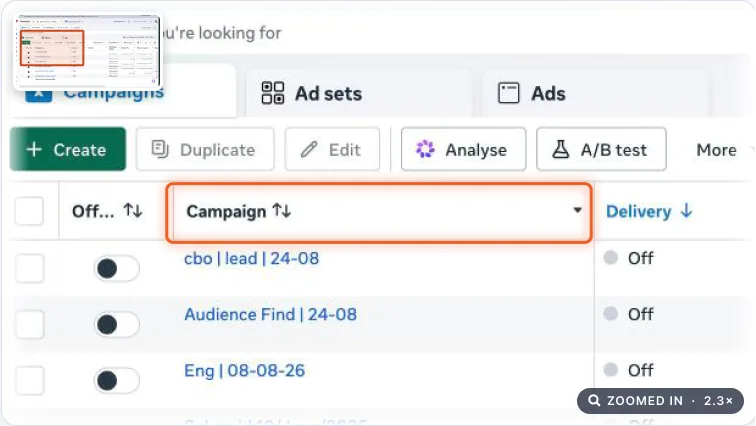
Ads Manager campaign list with the Campaign name column highlighted. Real screenshot, Oct 2026.
Stage 2
Review tracking
Bad tracking means the account is over- or under-reporting results.
- 1
Install the Meta Pixel Helper Chrome extension. Visit the home, landing and sales pages and check the Pixel fires on each.
- 2
In Events Manager, open the dataset (pixel) and check each key event: is it received from both Browser and Server (Conversions API)? Is the Event Match Quality score 6 or higher?
- Conversions API (CAPI) sends events from the website’s server to Meta, so results aren’t lost when browsers block the pixel.
- Browser only, or a low score? Recommend CAPI setup (see SOP 005).
- 3
Check UTMs: in Ads Manager, click Columns → Customise columns, type “URL” in the search box, tick “URL parameters” and Apply.
- Every URL should have UTMs such as utm_source=facebook, utm_medium=paid, utm_campaign=lead-generation.
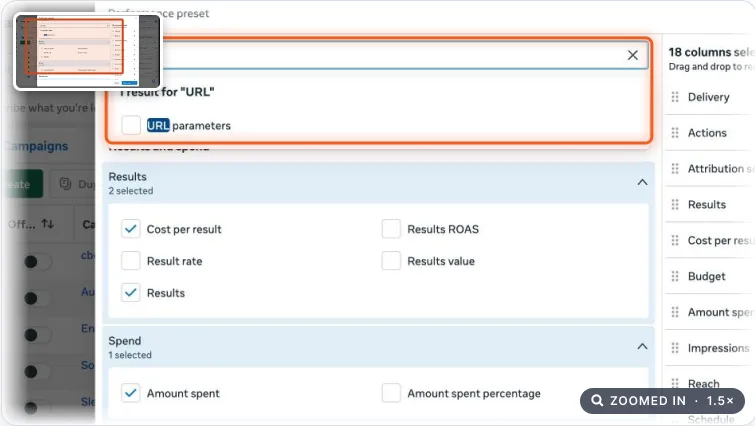
Customise columns dialog with URL typed in the search box and URL parameters shown. Real screenshot, Oct 2026. - 4
To keep a record, select the campaigns, click Export → Customise export, name the report and Export.
- 5
Confirm the domain is verified (SOP 097).
- 6
Ask the client for last month’s lead or sales sheet from their CRM. Compare it with Meta’s result count. A big gap means tracking is double-counting or leads are low quality.
Stage 3
Review audiences
- 1
Compare current audiences with the customer persona. Keep any that perform well (good ROAS) even if they don’t match.
- 2
Check prospecting is broad enough: Advantage+ audience on, or wide original audiences. Tiny interest-stacked audiences are a common reason for high costs in 2026.
- 3
Make sure warm remarketing runs separately from prospecting, and prospecting excludes existing customers or leads (unless it’s an upsell).
- 4
Check frequency (Columns → Delivery). Warm audiences seeing ads more than 4–5 times a week, or cold above about 2.5, usually means creative fatigue.
Stage 4
Review ads and performance
- 1
Each ad needs a clear call to action, a unique angle, and a message that matches its landing page.
- 2
Check the quality ranking (how people rate your ad against other ads shown to the same audience). Look only at ads with 500+ impressions. It should be at least Average. Replace Below Average ads with a new creative idea, not just a new headline.
- 3
Sort campaigns, then ad sets and ads, by “Amount spent”. Is most budget going to the lowest cost per result (CPA) or best return on ad spend (ROAS)?
- Before judging, check the attribution setting and the funnel role. Prospecting nearly always shows a weaker ROAS than remarketing, but it feeds remarketing.
- 4
Write your action plan in the audit sheet, one line per ad set, using these starting rules:
- Pause: spent about 3× the target cost per result with zero results.
- Shift budget away: cost per result 30%+ above target for 7+ days.
- Scale: at or below target → raise the budget about 20% every 3–4 days.
- Send the client your top 3 actions, each with a screenshot as proof.
Note
These are starting rules. Always check them against the account’s own history and the client’s lead quality.
Practice & check
Now do it for real
Reading is not doing. Open your own account and complete this task before you move on.
Practice task (5 min)
Pick one campaign and score it pass or fail on structure, naming, tracking, audience and creative.
Prove it
Two questions. Get both right and this SOP is done.
Common questions
What should a Meta Ads audit check?
Structure and naming, tracking (Pixel, Conversions API, events, UTMs), audiences, creative variety and fatigue, and budget versus results confirmed in the client’s CRM.
Why did Meta results drop after March 2026?
Often they didn’t. Meta changed attribution so only link clicks count as click-through conversions; other engagement moved to a 1-day engage-through window. Compare like with like and check the CRM.
How do I see UTM parameters in Meta Ads Manager?
Open Columns → Customise columns, type “URL” in the search box, tick “URL parameters” and click Apply.
Done. That’s a real skill, not a certificate.
Want to do this on real client budgets, with a mentor checking your work? That’s Level 2 at Unlearn. See the Digital Marketing track