The short answer
To move a Facebook Page into Meta Business Suite, open Settings → Accounts → Pages → “+ Add” → “Add an existing Facebook Page”. For an ad account, open Ad accounts → “+ Add” → “Add an existing ad account” and paste the Ad account ID from Ads Manager. Only claim assets you own; a claimed ad account can’t be removed.
Before you start
By the end of this SOP
All your Meta assets are managed under one Business Suite account.
- Time
- 5–10 minutes
- You’ll need
- A Meta Business Suite account (SOP 010).
- Who does this
- The asset owner with admin access to Business Suite.
About this SOP: why it matters, where and when
Why it matters: Manage Pages, ad accounts and the people who work on them in one place.
Where: Inside Meta Business Suite.
When: As soon as you start advertising, but only for assets you own. Claiming is permanent, so keep everything in one clean portfolio.
Stage 1
Move your Facebook Page
Very common: the Page was started from someone’s personal profile in the early days.
- 1
First check you have full control of the Page: on the Page, open Settings → Page access. Your name should be listed with full control (Facebook access).
- 2
Log in at business.facebook.com and open Settings (gear icon) → Accounts → Pages.
- 3
Click “+ Add” and choose “Add an existing Facebook Page”.
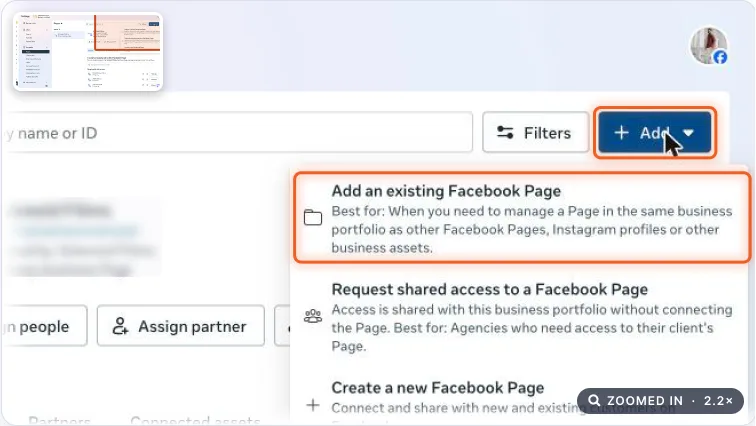
Pages settings with the Add menu open and Add an existing Facebook Page highlighted. Real screenshot, Oct 2026. - 4
Search for your Page or paste its URL, then click Next. If Instagram is connected, add both together.
- 5
Confirm who has full access, click Next, accept the terms and click “Add Page and Instagram”.
Note
If you are already an admin of the Page, the request is approved instantly.
Stage 2
Move your ad account
- 1
In Settings → Accounts → Ad accounts, click “+ Add” and choose “Add an existing ad account”.
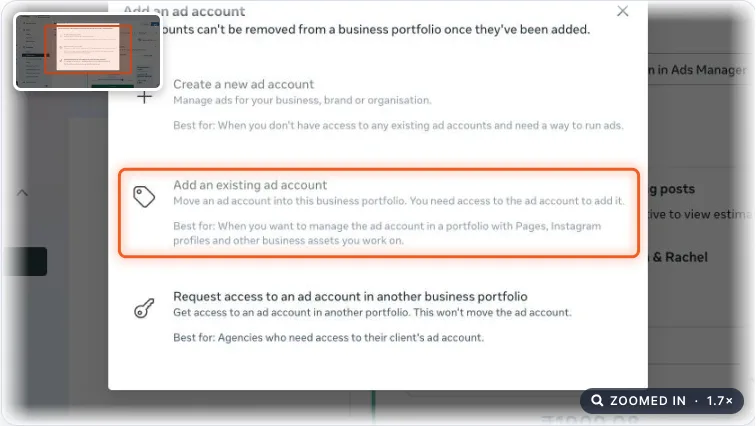
Add an ad account dialog with Add an existing ad account highlighted. Real screenshot, Oct 2026. - 2
Find your Ad account ID in Ads Manager, in the account dropdown at the top left, and copy it.
- 3
Paste the ID, click Next, accept the terms and click “Add ad account”. Then click Done.
Watch out
Once claimed, an ad account cannot be removed from the business portfolio. Make sure it’s yours.
Agency playbook
Doing this for a paying client
What a senior checks before calling the job done. Numbers are starting rules; compare them with the account’s own history.
What good looks like
- The client’s portfolio owns the Page, Instagram and ad account. The founder’s personal profile is no longer the only way in.
- Page access lists at least two client people with full control, both using two-factor login.
- Instagram is connected to the Page and visible in Business Suite for messages and ads.
- The old ad account is claimed, not replaced, so spend history, audiences and pixel data are kept.
Mistakes we see on real accounts
- Claiming the client’s Page into the agency portfolio. If the relationship ends, the client feels held hostage, and it can turn legal.
- Claiming the wrong ad account, like a relative’s old one. It can’t be removed and clutters the portfolio forever.
- Moving the Page but not Instagram. Ads can’t use the Instagram identity and DMs stay stuck on one person’s phone.
- Leaving a previous agency with full control. They can remove the client or run ads long after the contract ended.
Agency checklist before you call it done
- Before claiming, the client confirms in writing that they own the Page and ad account, not a past agency or ex-partner.
- You checked whether another portfolio already owns the assets. If yes, the client asks that owner to release them.
- Screenshots of Page access and Accounts → Pages and Ad accounts after the move, saved in the client folder.
- Unknown people and old agencies removed from Page access, only with the client’s approval.
- Moved assets shared with your agency as Partner (SOP 062).
- Change-log entry: assets moved, from which profile, date, who approved.
- Client access sheet updated with the Page ID, Instagram handle and ad account ID.
Handover message to the client
Hi [Client name], your Facebook Page [Page name], Instagram [@handle] and ad account [ID] are now owned by your business portfolio “[Business name]”. You and [Second admin] have full control. Access for [Old agency] has been removed, as you approved.
Senior tip
If a Page is stuck with a former agency or ex-employee, don’t start a new Page. Push for release, or escalate through Meta Business Support with ownership proof. A new Page throws away reviews, followers and trust.
Practice & check
Now do it for real
Reading is not doing. Open your own account and complete this task before you move on.
Practice task (5 min)
Find your Ad account ID in Ads Manager (account dropdown, top left) and write it down.
Prove it
Two questions. Get both right and this SOP is done.
Common questions
Where do I find my Meta Ad account ID?
In Ads Manager, open the account dropdown at the top left. The number next to the account name is the Ad account ID.
Should an agency claim a client’s Page?
No. Agencies and freelancers should request partner access instead of claiming assets they don’t own.
Done. That’s a real skill, not a certificate.
Next: SOP 124 — Audit a Meta Ads Account →
Want to do this on real client budgets, with a mentor checking your work? That’s Level 2 at Unlearn. See the Digital Marketing track