The short answer
To set up the Meta Conversions API, open Events Manager, select your dataset (pixel), and go to Settings → Conversions API. The easiest path is a partner integration: Shopify’s Facebook & Instagram app or the Meta for WooCommerce plugin set it up in minutes. For other sites, use the Conversions API Gateway or a server-side GTM host. Then make sure browser and server events share an event_id, and check Event Match Quality.
Before you start
By the end of this SOP
Key events (Lead, Purchase) arrive from both browser and server, deduplicated, with Event Match Quality of 6 or more.
- Time
- 30–90 minutes
- You’ll need
- Admin access to the Meta dataset (pixel) in Events Manager and the Meta Pixel installed (SOP 005).
- Who does this
- The person managing tracking; a developer only for custom websites.
About this SOP: why it matters, where and when
Why it matters: More complete conversion data improves optimisation and reporting, which usually lowers cost per result.
Where: Meta Events Manager, plus your store platform or a CAPI Gateway host.
When: As soon as the pixel works, and before scaling any conversion campaign.
Stage 1
Choose your setup method
- 1
Pick the simplest option that fits:
- Shopify: Facebook & Instagram app (Meta channel) with data sharing set to Maximum.
- WooCommerce: the official Meta for WooCommerce plugin, with Conversions API enabled in its settings.
- Other platforms with a Meta integration (Wix, Squarespace, many CRMs): turn on server-side or “Conversions API” in that integration.
- Custom sites: Conversions API Gateway (a small cloud server Meta helps you set up) or server-side GTM through a host such as Stape.
- 2
Avoid running two CAPI setups for the same event; it creates duplicates.
Stage 2
Connect it
- 1
In Events Manager, select your dataset and open Settings → Conversions API.
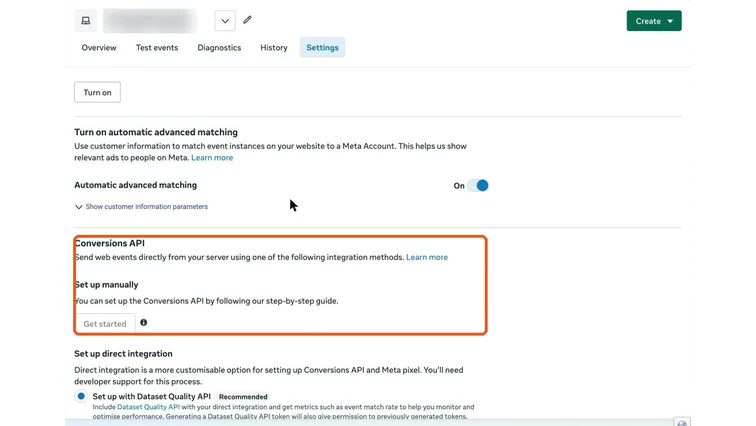
Events Manager dataset settings with the Conversions API section. Real screenshot, Oct 2026. - 2
Choose your partner integration and follow the connection steps, or choose Gateway and follow the hosting setup.
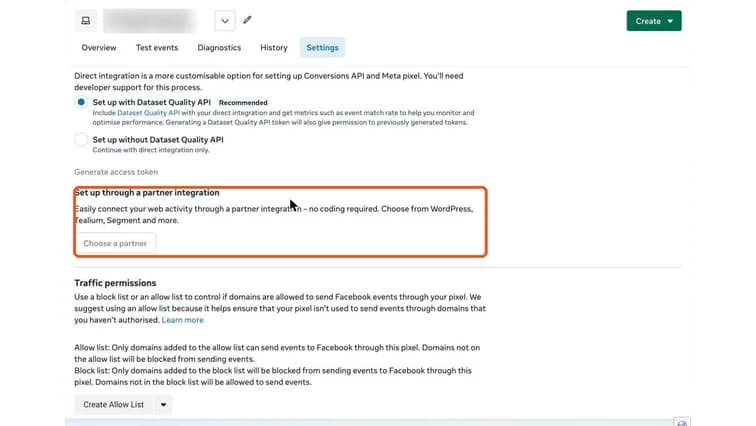
Conversions API setup options, including Set up through a partner integration. Real screenshot, Oct 2026. - 3
In Overview, open an event (for example Purchase or Lead) and check “Connection method”: you should see both Browser and Server.
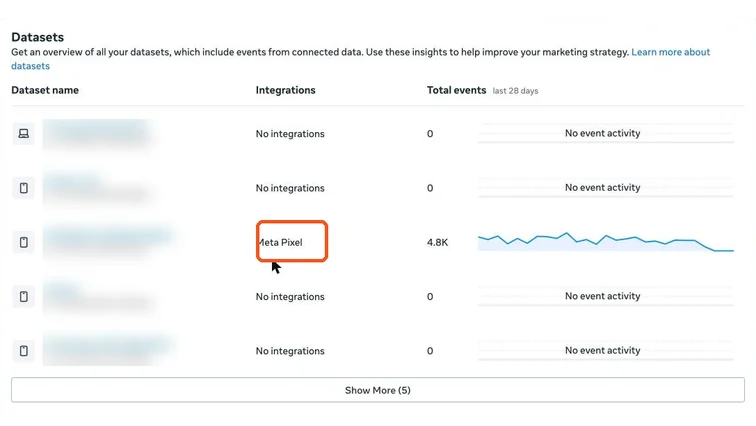
Events Manager datasets overview with integration type and event volume. Real screenshot, Oct 2026.
Stage 3
Deduplicate and test
When the same event arrives from browser and server, Meta needs a shared event_id to count it once.
- 1
Partner integrations handle event_id automatically. For GTM or custom setups, send the same event_id (for example the order ID) with the pixel event and the server event.
- 2
Open Test events, enter your website URL, and complete a test lead or purchase. You should see the event from Browser and Server, marked as deduplicated.
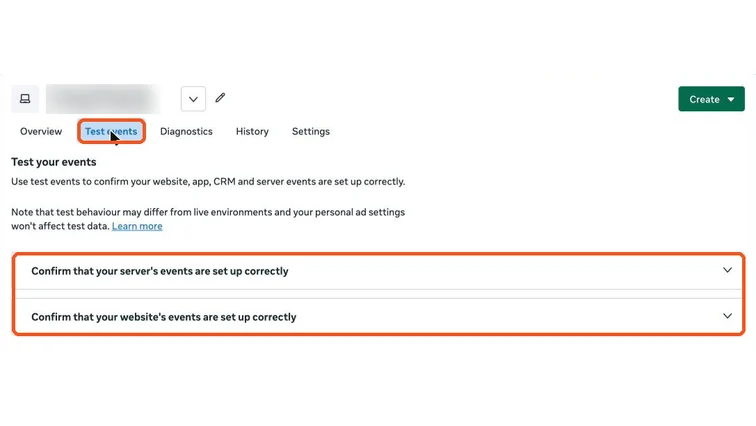
Events Manager Test events tab for checking server and website events. Real screenshot, Oct 2026. - 3
In Overview, check the deduplication status per event after 24–48 hours.
Stage 4
Raise Event Match Quality
- 1
Open the event in Overview and check Event Match Quality (out of 10).
- 2
Send more customer information with consent: hashed email and phone are the biggest boosts, then name, city and external ID. Partner integrations do the hashing for you.
- 3
Collect and use this data only with clear consent and a privacy policy.
Watch out
India’s DPDP Act requires a lawful basis for personal data. Hashing protects data in transit; it doesn’t replace consent.
Practice & check
Now do it for real
Reading is not doing. Open your own account and complete this task before you move on.
Practice task (5 min)
On a test WooCommerce or Shopify store, enable CAPI through the official integration, place a test order and screenshot Test events showing Browser and Server with deduplication.
Prove it
Two questions. Get both right and this SOP is done.
Common questions
Is the Meta Conversions API free?
The API is free. Partner integrations are free; a CAPI Gateway or server-side GTM host has a small monthly hosting cost.
Do I still need the Meta Pixel with CAPI?
Yes. Meta recommends both, deduplicated, because each catches events the other misses.
What is a good Event Match Quality score?
6 or higher is a reasonable target for your main event. Purchase events with email and phone often score 7–9.
Done. That’s a real skill, not a certificate.
Next: SOP 327 — Test Meta Ad Creatives and Find Winners Faster →
Want to do this on real client budgets, with a mentor checking your work? That’s Level 2 at Unlearn. See the Digital Marketing track