The short answer
Choose your Meta Ads objective from your goal and your tracking. If you want website sales or sign-ups and Meta can track them, choose Sales (or Leads with website conversions). If enquiries happen on WhatsApp or Messenger, use Leads or Sales with a Messaging destination. If Meta can’t track the result, use an instant form. If results are rare, optimise for a more frequent step such as initiate checkout.
Before you start
By the end of this SOP
You know exactly which objective to choose and why.
- Time
- 10 minutes
- You’ll need
- A rough budget and a clear reason to run ads.
- Who does this
- The person responsible for paid traffic.
About this SOP: why it matters, where and when
Why it matters: The right objective can make or break a campaign.
Where: Pen and paper, then Ads Manager.
When: Every time you plan a new Meta campaign.
Stage 1
Define your goal
- 1
Write your business goal in one sentence.
- Example: “Grow our email list by getting sign-ups on our landing page.”
- 2
Decide the funnel stage: awareness (TOFU), consideration (MOFU) or purchase (BOFU).
- 3
Choose the one number (KPI) your ad should improve, e.g. number of leads from the landing page.
Stage 2
Check your tracking
Meta can only optimise for what it can see.
- 1
Already tracking this KPI? Go to the next stage.
- 2
Not tracking yet, but it happens on your website (purchases, leads)? Install the Meta Pixel and set up conversion events.
- 3
Cannot track it (no website access)? Pick something Meta tracks by itself: engagement, link clicks, video views, or leads with Meta Lead Ads.
Note
Do NOT choose a sales or conversion objective if Meta cannot track the result.
Stage 3
Choose the objective in Ads Manager
Diagram
- Is your goal sales or sign-ups on your website?
Choose Awareness, Traffic or Engagement
- Can Meta track that result (Pixel / Conversions API)?
Pick what Meta can track: Engagement, Traffic, or Leads with an instant form
- Will each ad set get about 50 of these results in 7 days?
Optimise for a more frequent step, e.g. add to cart or landing page view
Choose Sales (or Leads with website conversions)
- 1
In Ads Manager, click “+ Create” and you will see the objectives: Awareness, Traffic, Engagement, Leads, App promotion, Sales.
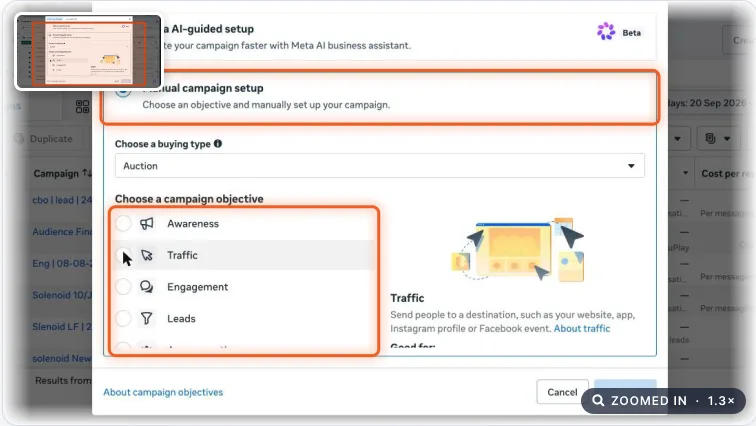
Create new campaign dialog with the campaign setup options and the campaign objective list highlighted. Real screenshot, Oct 2026. Note
Since 2025, Advantage+ is switched on by default for Sales, Leads and App promotion. If your account still shows a “Manual campaign setup” option, you can pick it, but most new accounts go straight to the objective list.
- 2
Does your ad promote credit, loans, insurance, jobs, housing or politics? Turn on the matching Special Ad Category on the campaign.
Watch out
Skipping this gets ads rejected and can restrict the ad account. Education courses don’t need it, but job or placement ads for hiring usually do.
- 3
Want sales or sign-ups on your site and can track them? Choose Sales (or Leads with website conversions).
- 4
Most of your enquiries come on WhatsApp? Choose Leads (or Sales) and set the conversion location to Messaging apps → WhatsApp. Meta then optimises for conversations, not clicks.
- 5
Will each ad set get about 50 results in 7 days? If not, optimise for a more frequent action.
- Example: only 30 purchases a month but 300 checkout starts, so optimise for initiate checkout.
- Add to cart is usually too shallow; it brings window shoppers. Pick the deepest step that still reaches about 50 a week.
- 6
Going for leads? Use your landing page with a conversion objective, or let Meta collect leads with an instant form (Leads objective). With instant forms, choose “Higher intent” and add a qualifying question so you don’t pay for junk leads.
Practice & check
Now do it for real
Reading is not doing. Open your own account and complete this task before you move on.
Practice task (5 min)
Write the goal, funnel stage and KPI for your next campaign, then pick the objective that fits.
Prove it
Two questions. Get both right and this SOP is done.
Common questions
What are the Meta Ads campaign objectives in 2026?
Awareness, Traffic, Engagement, Leads, App promotion and Sales. You see them after clicking “+ Create” in Ads Manager. Advantage+ is on by default for Sales, Leads and App promotion.
Do I need a Special Ad Category?
Only if your ads are about credit, financial products, employment, housing or social issues and politics. If they are, you must turn it on, or ads get rejected.
Should I choose Leads or Sales for a sign-up form?
If the form is on your website and the Pixel tracks it, use Sales or Leads with website conversions. If you want Meta to collect the details, use Leads with an instant form.
Done. That’s a real skill, not a certificate.
Next: SOP 073 — Name Your Meta Campaigns the Smart Way →
Want to do this on real client budgets, with a mentor checking your work? That’s Level 2 at Unlearn. See the Digital Marketing track