The short answer
To audit a website for SEO, crawl it with a tool such as Screaming Frog (free up to 500 URLs) or Semrush Site Audit, and compare with Search Console’s indexing and Core Web Vitals reports. Check status codes, indexability, titles and meta descriptions, H1s, canonicals, redirects, broken links, images, speed, mobile usability, structured data, sitemap and robots.txt. Then list fixes by impact and effort, starting with anything stopping important pages from being indexed.
Before you start
By the end of this SOP
An audit sheet with every issue, the pages affected, impact, effort and owner, and a fix-first list.
- Time
- 2–4 hours for a small site
- You’ll need
- Search Console access (SOP 206), a crawler (Screaming Frog free or Semrush), and PageSpeed Insights.
- Who does this
- The SEO specialist, with the web developer for fixes.
About this SOP: why it matters, where and when
Why it matters: Technical problems can block indexing or waste crawl effort across the whole site, cancelling out good content.
Where: A crawler, Google Search Console, PageSpeed Insights and a Google Sheet.
When: When you take on a new site, after a redesign or migration, and every quarter.
Stage 1
Crawl the site
- 1
In Screaming Frog, enter the homepage URL and Start. For bigger sites, use Semrush Site Audit or a paid crawler licence.
- 2
In configuration, connect Search Console and GA4 (optional) and add the XML sitemap so the crawler also finds pages not linked internally.
- 3
Export the Internal → All tab to Google Sheets.
Stage 2
Check indexing and status
- 1
Status codes: list 4xx (broken) and 5xx (server errors), and 3xx redirects linked internally (SOP 318).
- 2
Indexability: find important pages that are noindex, canonicalised to another URL, or blocked by robots.txt (SOP 315).
- 3
Compare with Search Console → Pages: “Crawled – currently not indexed” and “Discovered – not indexed” on important pages are high priority (SOP 209).
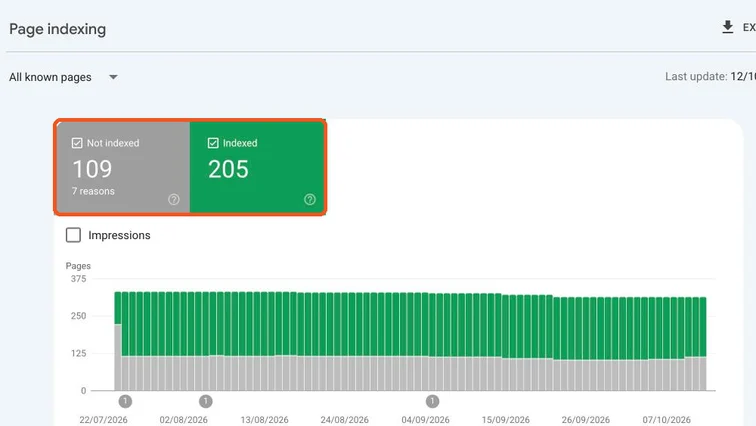
Search Console Page indexing report. Real screenshot, Oct 2026.
Stage 3
Check on-page basics
- 1
Titles: missing, duplicate, over 60 characters, or not describing the page (SOP 214).
- 2
Meta descriptions: missing or duplicate.
- 3
H1: missing or more than one per page; headings in a logical order (SOP 215).
- 4
Images: missing alt text, files over 200 KB (SOP 217).
- 5
Thin pages: under ~200 words with no clear purpose (tag pages, empty categories).
Stage 4
Check speed, mobile and structure
- 1
Search Console → Core Web Vitals: groups of URLs that fail on mobile. Test a sample in PageSpeed Insights (SOP 058).
- 2
Structured data: test key templates in the Rich Results Test (SOP 317).
- 3
Sitemap and robots.txt: sitemap lists only indexable 200 pages; robots.txt doesn’t block important sections (SOP 207, robots.txt guide).
- 4
Internal links: important pages are reachable within 3 clicks of the homepage (SOP 340).
Stage 5
Prioritise and hand over
- 1
For each issue: pages affected, impact (high/medium/low), effort, owner.
- 2
Fix in this order: indexing blockers → broken pages and redirects → speed on key templates → on-page issues → nice-to-haves.
- 3
Fix by template where possible (one change fixes 100 product pages), then re-crawl to confirm.
Practice & check
Now do it for real
Reading is not doing. Open your own account and complete this task before you move on.
Practice task (5 min)
Crawl a small website with the free Screaming Frog version and write a fix-first list of the top 10 issues with impact and owner.
Prove it
Two questions. Get both right and this SOP is done.
Common questions
How often should I do an SEO audit?
A full audit every quarter, and a quick check after any redesign, migration or big plugin update.
Is Screaming Frog free?
Yes, up to 500 URLs per crawl, which covers most small business sites.
What is the most common SEO audit problem?
On small Kerala business sites: slow mobile pages, duplicate or missing titles, and important pages not indexed.
Done. That’s a real skill, not a certificate.
Next: SOP 335 — Optimise WooCommerce Product and Category Pages for SEO →
Want to do this on real client budgets, with a mentor checking your work? That’s Level 2 at Unlearn. See the Digital Marketing track