The short answer
To audit internal links, crawl the site with Screaming Frog (adding the XML sitemap and Search Console), then check three things: orphan pages that appear in the sitemap or Search Console but have no internal links, important pages more than 3 clicks from the homepage, and pages with few inlinks or vague anchor text. Fix them by linking from relevant hubs, menus and related articles with descriptive anchors.
Before you start
By the end of this SOP
No important orphan pages, key pages within 3 clicks, and a list of internal links added.
- Time
- 45–60 minutes
- You’ll need
- A crawler (Screaming Frog free or Semrush) and Search Console access.
- Who does this
- The SEO specialist.
About this SOP: why it matters, where and when
Why it matters: Better internal linking spreads authority to the pages that make money and often lifts rankings without new content.
Where: Screaming Frog, Search Console and your CMS.
When: Quarterly, and after publishing a batch of new content.
Stage 1
Crawl with sitemap and Search Console
- 1
In Screaming Frog, open Configuration → Spider → Crawl and tick “Crawl linked XML sitemaps”, then add your sitemap URL.
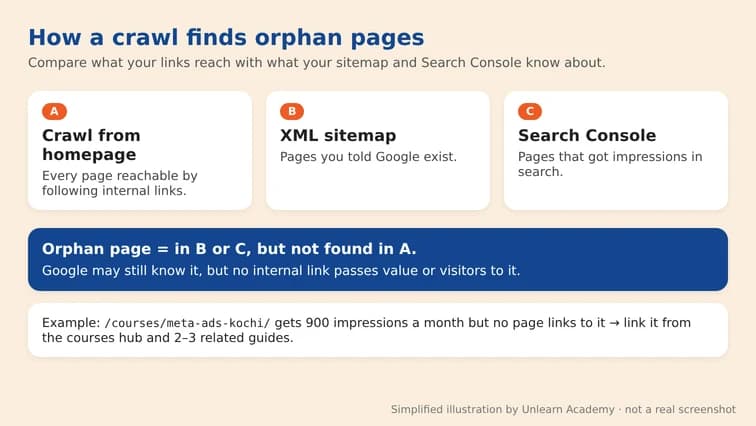
How a crawl, the XML sitemap and Search Console together reveal orphan pages. Simplified illustration by Unlearn Academy, not a real screenshot. - 2
Connect Search Console under Configuration → API Access so pages with impressions are included.
- 3
Run the crawl, then Crawl Analysis → Start, so orphan reports are calculated.
Stage 2
Find the problems
- 1
Orphans: Sitemaps → Orphan URLs, and Search Console → Orphan URLs. Mark which ones matter (services, guides, products).
- 2
Depth: in Internal, sort by Crawl Depth. Important pages at depth 4+ need links from higher-level pages.
- 3
Inlinks: sort by Unique Inlinks. Money pages with only 1–2 internal links need more.
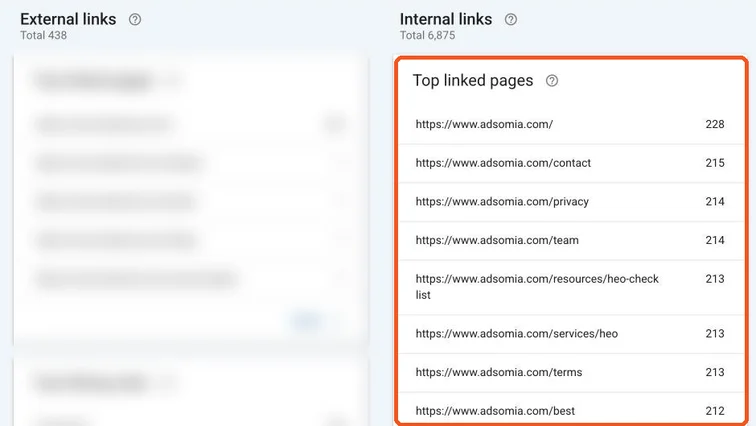
Search Console Links report showing internal links per page, a quick check before a full crawl. Real screenshot, Oct 2026. - 4
Anchors: check the Inlinks tab for “click here” or “read more” on important links; use descriptive anchors instead.
Stage 3
Fix the links
- 1
Link orphan and deep pages from their topic hub or category page.
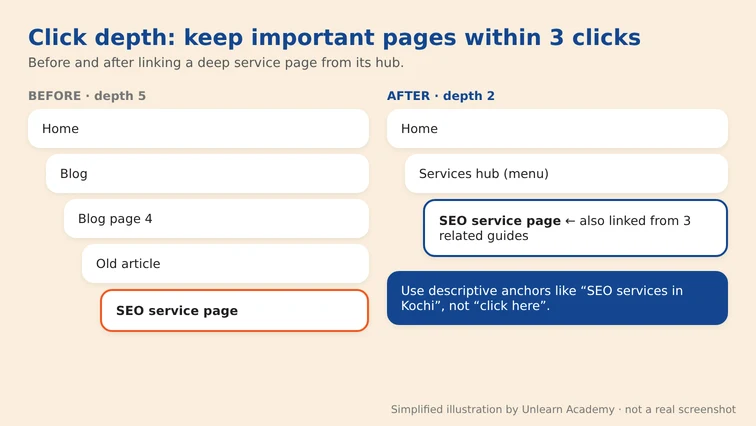
Click depth before and after linking a deep service page from its hub. Simplified illustration by Unlearn Academy, not a real screenshot. - 2
Add 2–3 contextual links from related articles, with anchors that describe the target page (SOP 216).
- 3
Add key service pages to the main menu or footer if they matter to most visitors.
- 4
- 5
Re-crawl and confirm important pages now have inlinks and sit within 3 clicks.
Practice & check
Now do it for real
Reading is not doing. Open your own account and complete this task before you move on.
Practice task (5 min)
Crawl a small site with sitemap and Search Console connected, list its orphan pages and plan 10 internal links to fix the important ones.
Prove it
Two questions. Get both right and this SOP is done.
Common questions
How do I find orphan pages for free?
Screaming Frog’s free version can crawl your sitemap and compare it with linked pages (up to 500 URLs). Search Console pages with impressions but no internal links are also orphans.
How many internal links should a page have?
There’s no fixed number. Important pages should get links from several relevant pages and be reachable within 3 clicks of the homepage.
Do internal links help SEO?
Yes. They help Google find pages, understand topics and see which pages you consider important.
Done. That’s a real skill, not a certificate.
Want to do this on real client budgets, with a mentor checking your work? That’s Level 2 at Unlearn. See the Digital Marketing track