The short answer
To add internal links, open Search Console → Links → Internal links to see which pages your site links to most. Make sure your important service and course pages are near the top. Then, from related pages, add links in the body text with descriptive anchor text (e.g. “digital marketing course in Trivandrum”), and link every new page from at least two existing ones.
Before you start
By the end of this SOP
Important pages have more internal links, and every new page is linked from related content.
- Time
- 30–45 minutes
- You’ll need
- Search Console (SOP 206) and edit access to the site.
- Who does this
- The person responsible for SEO or content.
About this SOP: why it matters, where and when
Why it matters: Pages with more relevant internal links are found faster and usually rank better. Visitors also find the next step.
Where: In Search Console → Links, and the page editor.
When: Every time you publish a page, and as a quarterly check.
Stage 1
See where your links go now
- 1
In Search Console, open Links (bottom of the left menu) and look at Internal links → Top linked pages.
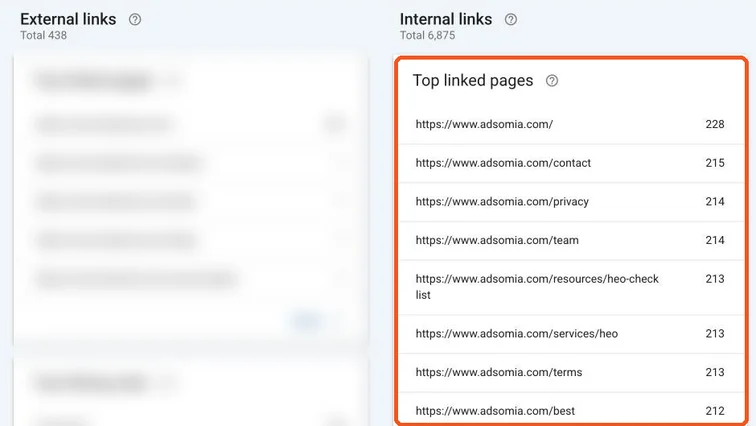
Search Console Links report with internal Top linked pages highlighted; external links blurred. Real screenshot, Oct 2026. Tip
In this real report, contact, privacy, team and terms get as many internal links as the main service pages, because they’re all in the footer. Body links are how you give extra weight to the pages that earn money.
- 2
Click MORE to see the full list. Are your key service, course or product pages near the top? Note any important page with very few links.
Stage 2
Add links from related pages
- 1
Find related pages: search Google for site:yourdomain.com keyword, or check which of your pages already rank for related queries (SOP 210).
- 2
In those pages, link to the important page in the body text, where it helps the reader.
- Good anchor: “our digital marketing course in Trivandrum”.
- Weak anchor: “click here”, “read more”.
- 3
Link every new page from at least two existing, relevant pages, and link from the new page to the next logical step.
Watch out
Don’t stuff the same exact anchor everywhere or add dozens of links to one page. Natural, varied, useful links work best.
Stage 3
Fix broken and wasted links
- 1
Check Page indexing for 404s (SOP 209) and update any internal links that point to them.
- 2
Update links that go through redirects to point straight at the final URL.
Agency playbook
Doing this for a paying client
What a senior checks before calling the job done. Numbers are starting rules; compare them with the account’s own history.
What good looks like
- Every money page can be reached in three clicks or fewer from the homepage.
- No orphan pages: every page you want indexed has at least one body link from a related page.
- Anchors are descriptive and varied. Starting rule: no single exact-match anchor on more than about half the links to a page.
- Internal links go straight to the final, indexable URL. No redirects, 404s or nofollow on your own pages.
- Each new link makes sense to a reader in that sentence. If you’d cut it from print, cut it here.
Mistakes we see on real accounts
- Adding the same keyword anchor in every blog footer. It looks manipulative and does little for readers.
- Removing a menu link during a redesign. The page loses its strongest internal link, and rankings can slide.
- Using nofollow on internal links to “save link juice”. That old trick just weakens your own pages.
- Linking two similar pages to each other with the same anchor. You make keyword cannibalisation worse, not better.
Agency checklist before you call it done
- Before crawl saved in the client folder, using Screaming Frog (free to 500 URLs) or a similar crawler.
- Link map sheet lists source page, anchor text, target page and date added.
- Menu and footer changes were approved by the client before you touched them.
- Change log updated, with a note of any page that lost links, not just pages that gained them.
- After crawl run to confirm no new broken links or redirect chains.
- Report shows changes in impressions, clicks and enquiries for target pages over 6–12 weeks, not just link counts.
Handover message to the client
Hi [Client name], we added [number] internal links pointing to [key pages] and fixed [number] broken links. Your menu and footer [did/did not] change. We’ll share how these pages move in Search Console on [date].
Senior tip
In GSC, find pages already ranking in positions 8–20. Link to them from your strongest pages first. That’s often the quickest win internal linking can give.
Practice & check
Now do it for real
Reading is not doing. Open your own account and complete this task before you move on.
Practice task (5 min)
Pick one money page on a real site. Find three related pages and write the sentence and anchor text you’d add to each.
Prove it
Two questions. Get both right and this SOP is done.
Common questions
How many internal links should a page have?
There’s no fixed number. Add links wherever they genuinely help the reader move to a related topic or the next step.
Do footer links count?
Yes, but body links in relevant content carry more context. Use them to point to your most important pages.
Done. That’s a real skill, not a certificate.
Next: SOP 217 — Optimise Images for SEO and Speed →
Want to do this on real client budgets, with a mentor checking your work? That’s Level 2 at Unlearn. See the Digital Marketing track