The short answer
To fix indexing issues, open Search Console → Indexing → Pages and scroll to “Why pages aren’t indexed”. Many reasons are normal (Page with redirect, Alternative page with proper canonical tag, noindex on purpose). Fix the rest: broken links causing 404s, important pages blocked by robots.txt or noindex, and thin or duplicate pages stuck in Crawled or Discovered – currently not indexed. Then click Validate fix.
Before you start
By the end of this SOP
Every not-indexed reason is reviewed, real problems are fixed, and fixes are being validated.
- Time
- 30–60 minutes
- You’ll need
- A verified Search Console property (SOP 206) and access to the website.
- Who does this
- The person responsible for SEO or the website.
About this SOP: why it matters, where and when
Why it matters: Important pages that aren’t indexed get zero search traffic, no matter how good they are.
Where: In Search Console → Indexing → Pages, and your website.
When: Monthly, and after site migrations or big changes.
Stage 1
Read the overview
- 1
Open Indexing → Pages. Note how many pages are Indexed and Not indexed, and whether the trend changed suddenly.
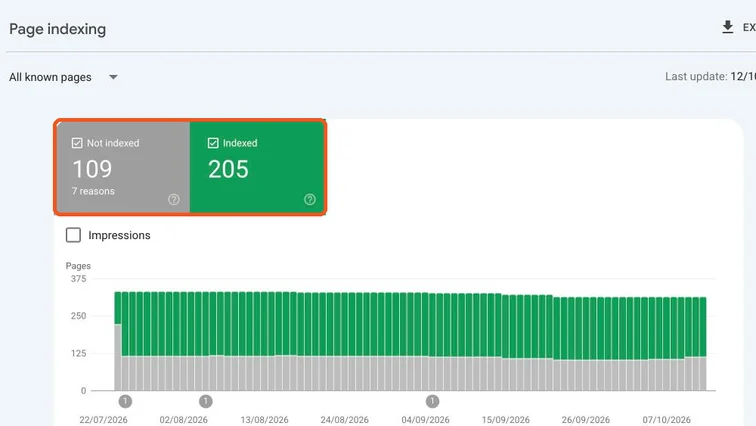
Page indexing report with Not indexed and Indexed totals highlighted. Real screenshot, Oct 2026. - 2
A sudden jump in Not indexed after a redesign or plugin change is a red flag. Investigate that first.
Stage 2
Sort reasons: ignore or fix
- 1
Scroll to “Why pages aren’t indexed” and click each reason to see example URLs.
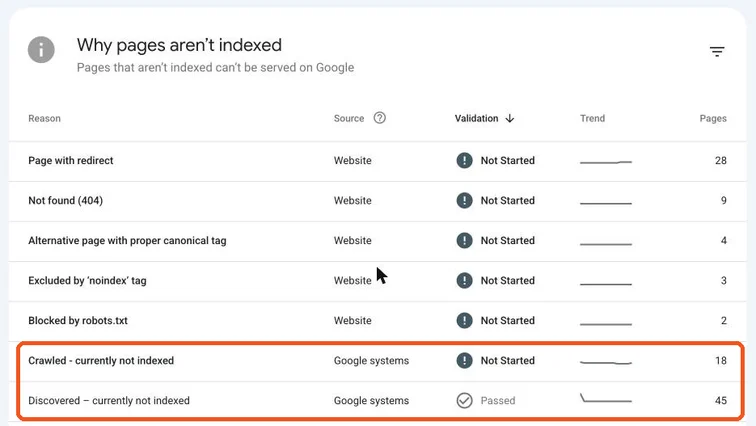
Why pages aren’t indexed table with Crawled and Discovered currently not indexed highlighted. Real screenshot, Oct 2026. - 2
Usually fine (no action if the URLs are what you expect):
- Page with redirect: old URLs that now redirect.
- Alternative page with proper canonical tag: duplicates pointing to the main version.
- Excluded by ‘noindex’ tag: only if you added noindex on purpose (thank-you pages, tag archives).
- 3
Fix these:
- Not found (404): update internal links pointing there, or redirect important old URLs to the closest live page.
- Blocked by robots.txt or noindex on an important page: remove the block.
- Crawled – currently not indexed: Google saw it and didn’t think it was worth indexing. Improve, merge or remove thin pages.
- Discovered – currently not indexed: Google knows the URL but hasn’t crawled it. Add internal links from strong pages and keep it in the sitemap.
Watch out
Never mass-redirect all 404s to the homepage. Redirect only to a genuinely relevant page, or let truly dead pages return 404.
Stage 3
Validate the fix
- 1
After fixing a reason, open it in the report and click “Validate fix”. Google re-checks the URLs over the next days or weeks.
- 2
For one important page, use URL Inspection → Request indexing instead (SOP 208).
Practice & check
Now do it for real
Reading is not doing. Open your own account and complete this task before you move on.
Practice task (5 min)
Open the Page indexing report for a real site. For each reason, write “ignore” or “fix” and one example URL.
Prove it
Two questions. Get both right and this SOP is done.
Common questions
Is it bad to have pages not indexed?
Not always. Redirects, duplicates and intentional noindex pages should not be indexed. Focus on important pages that are missing.
How long does Validate fix take?
Often a few days to a few weeks, depending on how many URLs Google needs to re-check.
Done. That’s a real skill, not a certificate.
Next: SOP 210 — Find Pages and Keywords to Improve with Search Console →
Want to do this on real client budgets, with a mentor checking your work? That’s Level 2 at Unlearn. See the Digital Marketing track