The short answer
To check if a page is indexed, paste its full URL into the search bar at the top of Google Search Console. “URL is on Google” means it’s indexed. Open Page indexing to see the last crawl and whether Google’s chosen canonical matches yours. If you just fixed or published the page, click Test live URL, then Request indexing.
Before you start
By the end of this SOP
You know whether a page is indexed, why not if it isn’t, and what to do next.
- Time
- 2–5 minutes per page
- You’ll need
- A verified Search Console property (SOP 206).
- Who does this
- The person responsible for SEO.
About this SOP: why it matters, where and when
Why it matters: A page that isn’t indexed can’t rank. Fix that first before touching content or links.
Where: In Search Console → URL inspection.
When: After publishing or changing an important page, or when a page isn’t showing in Google.
Stage 1
Inspect the URL
- 1
Copy the exact URL from the browser (with https:// and www if used) and paste it into “Inspect any URL” at the top of Search Console. Press Enter.
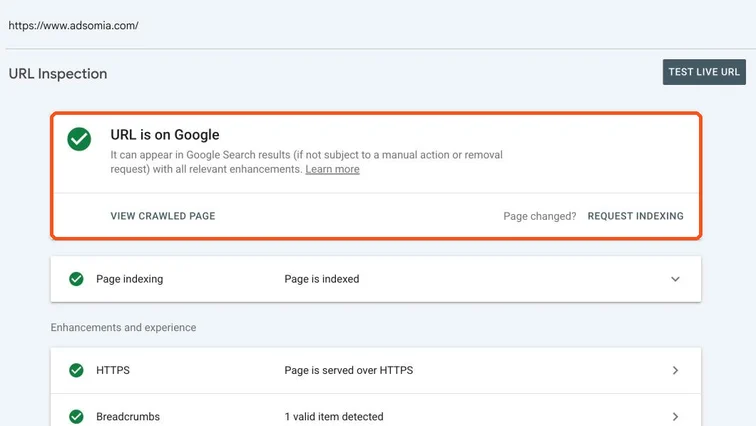
URL Inspection result showing URL is on Google, with Request indexing and Test live URL. Real screenshot, Oct 2026. - 2
Read the result:
- “URL is on Google”: indexed. If it still doesn’t rank, it’s a content or competition problem, not indexing.
- “URL is not on Google”: open Page indexing to see the reason (noindex, redirect, duplicate, not crawled yet…).
Stage 2
Check crawl and canonical
- 1
Expand Page indexing. Check Last crawl, Crawl allowed and Indexing allowed. Then compare User-declared canonical with Google-selected canonical.
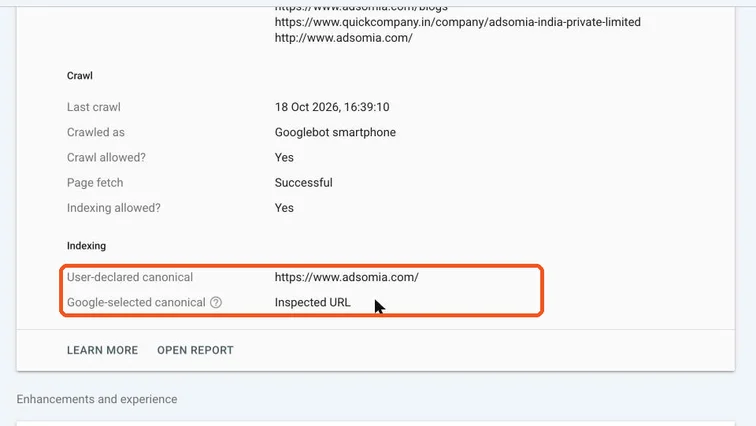
Page indexing details with user-declared canonical and Google-selected canonical highlighted. Real screenshot, Oct 2026. - 2
If Google chose a different canonical, it thinks another page is the main version. Fix duplicates or the canonical tag so they agree.
Stage 3
Request indexing (only when it helps)
- 1
After fixing the problem or publishing new content, click Test live URL to confirm Google can now see the page correctly.
- 2
Then click Request indexing.
Note
There’s a daily limit, and requesting again doesn’t speed things up. Use it for important new or fixed pages only.
Practice & check
Now do it for real
Reading is not doing. Open your own account and complete this task before you move on.
Practice task (5 min)
Inspect your homepage and one blog post. Note the last crawl date and whether the canonicals match.
Prove it
Two questions. Get both right and this SOP is done.
Common questions
How long does Google take to index a new page?
Anything from hours to a few weeks. Good internal links, a sitemap and Request indexing for important pages help.
Can I check indexing without Search Console?
Searching site:yourdomain.com/page-url on Google gives a rough check, but URL Inspection is the reliable answer.
Done. That’s a real skill, not a certificate.
Next: SOP 209 — Find and Fix Page Indexing Issues in Search Console →
Want to do this on real client budgets, with a mentor checking your work? That’s Level 2 at Unlearn. See the Digital Marketing track