The short answer
To find SEO quick wins, open Search Console → Performance, set the last 3 months and switch on all four metrics. In Queries, sort by impressions and look for keywords with average position 8–20 (page 1 is close) or low CTR on page 1 (fix the title and description). Click a query, then the Pages tab: two pages ranking for it may be competing. Improve the page that best matches the search.
Before you start
By the end of this SOP
A short list of pages to improve, with the keyword and the change for each.
- Time
- 30–45 minutes a month
- You’ll need
- A Search Console property with at least a few weeks of data (SOP 206).
- Who does this
- The person responsible for SEO or content.
About this SOP: why it matters, where and when
Why it matters: Moving from position 12 to 5 can multiply clicks without new pages or links.
Where: In Search Console → Performance → Search results.
When: Monthly.
Stage 1
Set up the report
- 1
Open Performance → Search results. Choose 3 months and click all four boxes: Total clicks, Total impressions, Average CTR and Average position.
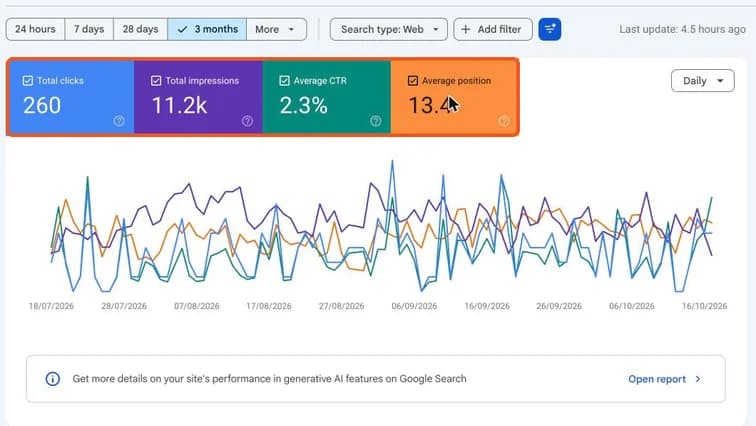
Search Console Performance report with Total clicks, Total impressions, Average CTR and Average position highlighted. Real screenshot, Oct 2026.
Stage 2
Find quick-win keywords
- 1
In the Queries tab, sort by Impressions. Look for:
- Position 8–20 with good impressions: almost on page 1. Improve the matching page.
- Position 1–5 but low CTR: the title and description don’t attract clicks. Rewrite them.
- Brand queries vs service queries: if almost all clicks are your brand name, the site isn’t yet winning new customers from search.
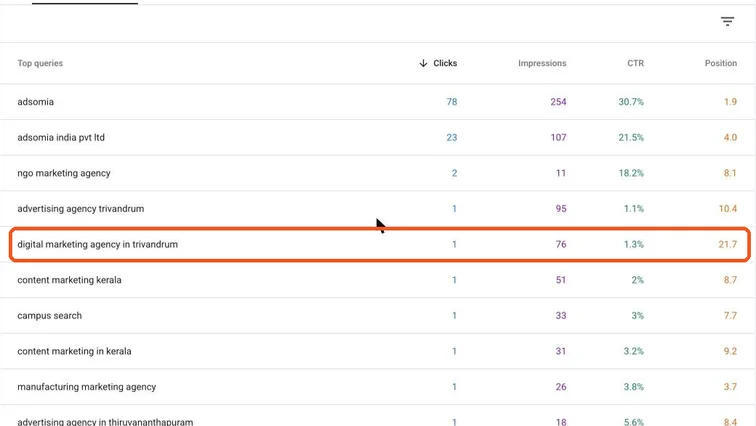
Top queries table with a query at position 21.7 and 76 impressions highlighted as a page-two opportunity. Real screenshot, Oct 2026. Tip
Example from a real agency account: “digital marketing agency in trivandrum” has 76 impressions at position 21.7. A focused, local service page could move it to page 1.
Stage 3
Check pages and competition between pages
- 1
Click a query, then open the Pages tab. If two or more pages from your site appear for the same query, they may be competing (keyword cannibalisation).
- 2
Pick the one page that best matches the search. Merge or clearly differentiate the others, and point internal links to the main page.
Stage 4
Improve and track
- 1
For each page, make one clear improvement:
- Answer the search intent in the first paragraph.
- Add missing subtopics people ask about.
- Update outdated facts, prices and years.
- Rewrite the title and meta description for clicks.
- Add internal links from related pages.
- 2
Log the date of the change. Compare the same query 4–8 weeks later using date comparison.
Practice & check
Now do it for real
Reading is not doing. Open your own account and complete this task before you move on.
Practice task (5 min)
Find three queries at position 8–20 for a real site, and write the one improvement you’d make to each page.
Prove it
Two questions. Get both right and this SOP is done.
Common questions
What is a good CTR in Google Search?
It depends heavily on position and the type of results shown. Compare your own pages at similar positions rather than one benchmark.
How often should I check Search Console?
A quick look weekly for problems, and a deeper Performance review monthly.
Done. That’s a real skill, not a certificate.
Next: SOP 211 — Investigate a Drop in Google Traffic →
Want to do this on real client budgets, with a mentor checking your work? That’s Level 2 at Unlearn. See the Digital Marketing track