The short answer
To investigate a drop in Google traffic, open Search Console → Performance and compare the last 28 days with the previous period. Check which pages and queries lost clicks, and whether impressions, position or CTR fell. Then rule out tracking problems, indexing issues, manual actions and seasonality, and check Google’s Search Status Dashboard for updates that match the date.
Before you start
By the end of this SOP
A written diagnosis: what dropped, the likely cause, and the fix.
- Time
- 1–2 hours
- Who does this
- The person responsible for SEO.
About this SOP: why it matters, where and when
Why it matters: Guessing wastes weeks. A structured check finds the real cause fast.
Where: In Search Console, GA4 and Google’s Search Status Dashboard.
When: As soon as traffic or leads from Google drop noticeably.
Stage 1
Confirm and size the drop
- 1
In Search Console → Performance, open the date menu → Compare. Choose “Compare last 28 days to previous period” (or year over year for seasonal businesses).
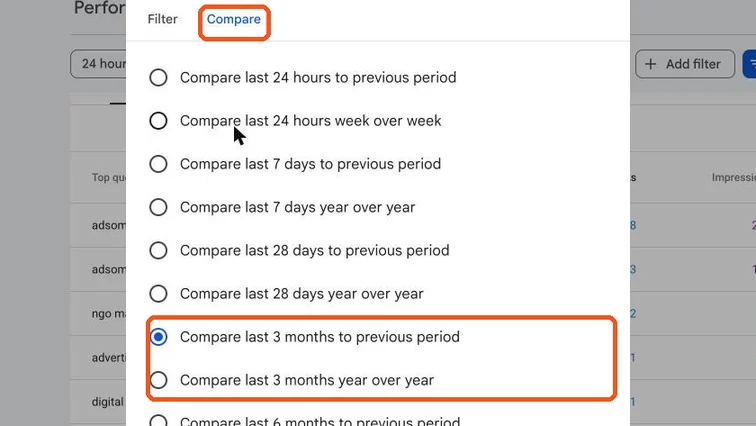
Date range window on the Compare tab with comparison options highlighted. Real screenshot, Oct 2026. - 2
Look at which metric fell:
- Impressions down: you’re showing less (indexing, rankings or demand fell).
- Position down: rankings dropped.
- CTR down with stable position: snippets changed, e.g. AI Overviews or ads above you.
- 3
Drop only in GA4, not in Search Console? It’s probably tracking (tag removed, consent banner, GA4 setup change), not SEO.
Tip
Check last year: admissions, festivals and exams make many Kerala businesses seasonal.
Stage 2
Find what dropped
- 1
With comparison on, open the Pages tab and sort by click difference. Note the top pages that lost clicks.
- 2
Do the same in Queries. Is it one topic, one page type (e.g. all blog posts), or the whole site?
Stage 3
Rule out the usual causes
- 1
Indexing: open Indexing → Pages. Did Not indexed jump? Inspect a dropped page with URL Inspection (SOP 208).
- 2
Manual actions: open Security & Manual Actions → Manual actions. “No issues detected” rules out a penalty.
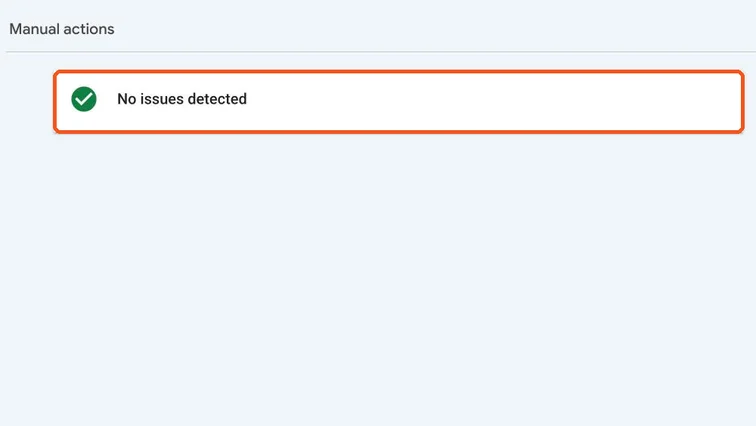
Manual actions report showing No issues detected. Real screenshot, Oct 2026. - 3
Site changes: redesign, URL changes without redirects, new plugins, robots.txt or noindex mistakes around the drop date.
- 4
Google updates: check status.search.google.com for core or spam updates that match the date.
- 5
Competitors: search your main keywords. Did a new competitor or AI Overview push you down?
Stage 4
Fix and report
- 1
Write a short note: what dropped, when, the most likely cause, and the fix.
- Technical cause (redirects, noindex, tracking): fix it immediately.
- Core update: improve the affected pages’ helpfulness and expertise; recovery takes time.
- Seasonal: no fix needed; plan content and ads ahead of next season.
- 2
Re-check the same comparison every 2–4 weeks.
Practice & check
Now do it for real
Reading is not doing. Open your own account and complete this task before you move on.
Practice task (5 min)
Run a 28-day comparison for a real site. Write which page lost the most clicks and your best guess at why.
Prove it
Two questions. Get both right and this SOP is done.
Common questions
How long does it take to recover from a Google core update?
Often weeks to months, and only after meaningful improvements. Some recover at the next core update.
Can AI Overviews reduce my clicks?
Yes. They can lower CTR for some informational searches even when your position stays the same. Check CTR alongside position.
Done. That’s a real skill, not a certificate.
Want to do this on real client budgets, with a mentor checking your work? That’s Level 2 at Unlearn. See the Digital Marketing track