The short answer
To audit a page’s on-page SEO, check in order: is it indexed (URL Inspection), does it match the search intent of its main keyword, is the title and meta description clear and unique, is there one H1 and a logical heading outline, is the content helpful and up to date, does it have useful internal links, are images optimised, and does it pass PageSpeed Insights. Write one fix per failed check.
Before you start
By the end of this SOP
A scored checklist for the page with prioritised fixes.
- Time
- 20–30 minutes per page
- You’ll need
- Search Console access (SOP 206) and the page’s main keyword.
- Who does this
- The person responsible for SEO.
About this SOP: why it matters, where and when
Why it matters: It finds the fixes that matter for a specific page, instead of generic “do more SEO”.
Where: In Search Console, Google Search, PageSpeed Insights and the page itself.
When: Before improving or proposing work on a page, and quarterly for top pages.
Stage 1
Run the nine checks
Mark each Pass, Fix or N/A in a sheet.
- 1
1. Indexed: URL Inspection says “URL is on Google” and the canonical is correct (SOP 208).
- 2
2. Intent: search the main keyword. Is this page the right type (guide, service, course) compared with what ranks?
- 3
3. Title and meta: keyword near the start, unique, right length, compelling (SOP 214).
- 4
4. Headings: one H1, question-led H2s, answer near the top (SOP 215).
- 5
5. Content: accurate, current, specific (prices, dates, local details), better than the top results.
- 6
6. Internal links: linked from related pages and linking to the next step (SOP 216).
- 7
7. Images: named, alt text, compressed, sized (SOP 217).
- 8
8. Structured data: valid schema where relevant: Organization or LocalBusiness, Article, BreadcrumbList, Product, Review, Event, Video. Test in Google’s Rich Results Test.
- FAQ rich results now show only for well-known government and health sites, and Google retired Course info rich results in 2025. FAQ markup is still fine for AI search, but don’t promise clients a rich result from it.
- While you’re here, check trust signals (E-E-A-T): a named author with real credentials, first-hand proof (photos, numbers, student work) and an updated date.
- 9
9. Speed and basics: run PageSpeed Insights on mobile. Check Performance, Accessibility, Best Practices and SEO.
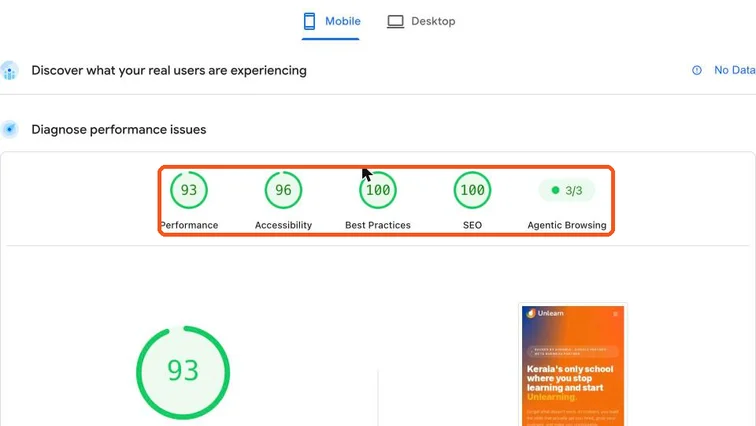
PageSpeed Insights mobile report for unlearnacademy.in showing Performance 93, Accessibility 96, Best Practices 100 and SEO 100. Real screenshot, Oct 2026. Note
A 100 SEO score means the technical basics pass. It doesn’t mean the page will rank; checks 2, 5 and 6 matter more.
Stage 2
Prioritise the fixes
- 1
Order fixes by impact: indexing and intent first, then content and internal links, then title and snippets, then images and speed.
- 2
Write each fix as an action: “Rewrite title to: …”, “Add H2 answering ‘what are the fees’”, “Link from blog post X”.
- 3
After making the changes, note the date and re-check the page in Search Console after 4–8 weeks.
Practice & check
Now do it for real
Reading is not doing. Open your own account and complete this task before you move on.
Practice task (5 min)
Audit one page of a real local business with the nine checks and write the top three fixes.
Prove it
Two questions. Get both right and this SOP is done.
Common questions
What is on-page SEO?
Everything on the page itself that helps it rank and convert: content, intent match, title, headings, internal links, images, structured data and speed.
How often should I audit pages?
Before working on a page, and every quarter for your most important pages.
Done. That’s a real skill, not a certificate.
Want to do this on real client budgets, with a mentor checking your work? That’s Level 2 at Unlearn. See the Digital Marketing track