The short answer
To optimise WooCommerce for SEO, give every product a unique, descriptive title and a description written for customers (not the manufacturer’s copy), add product schema with price, stock and reviews through your SEO plugin, use clear image file names and alt text, and write a short intro on category pages. Keep filter and sort URLs out of the index, and handle out-of-stock products without deleting pages that rank.
Before you start
By the end of this SOP
Product and category templates set up correctly, with priority products rewritten and passing the Rich Results Test.
- Time
- 30 minutes per template, then 10–15 minutes per product
- You’ll need
- WooCommerce admin access and an SEO plugin (Yoast WooCommerce SEO, Rank Math, AIOSEO or SEOPress).
- Who does this
- The store owner or SEO specialist.
About this SOP: why it matters, where and when
Why it matters: Shoppers search product and category terms with high buying intent. Pages built for them can sell without ad spend.
Where: WooCommerce → Products, Products → Categories, and your SEO plugin.
When: When launching a store, and for your top 20 products and categories first.
Stage 1
Product titles and descriptions
- 1
Product name: what people search, for example “Kasavu Set Mundu – Gold Border, 2.5 m” rather than “SKU-4471”.
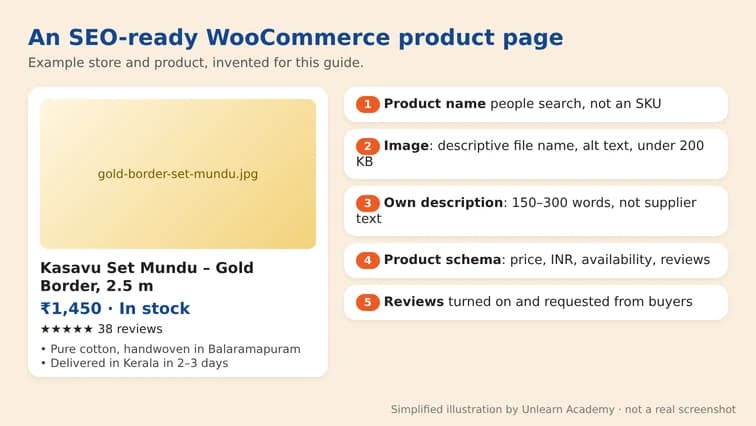
The parts of an SEO-ready WooCommerce product page: name, image, description, schema and reviews. Simplified illustration by Unlearn Academy, not a real screenshot. - 2
SEO title (in your plugin): product name + key attribute + brand, under 60 characters.
- 3
Description: write your own 150–300 words: who it’s for, size, material, care, delivery time in Kerala, what’s in the box. Don’t paste the supplier’s text used on 50 other sites.
- 4
Short description: 2–3 bullet points of the main benefits.
Stage 2
Product schema, images and reviews
- 1
Make sure your SEO plugin outputs Product schema with price, currency (INR), availability and reviews (Rank Math, Yoast WooCommerce SEO and AIOSEO do this).
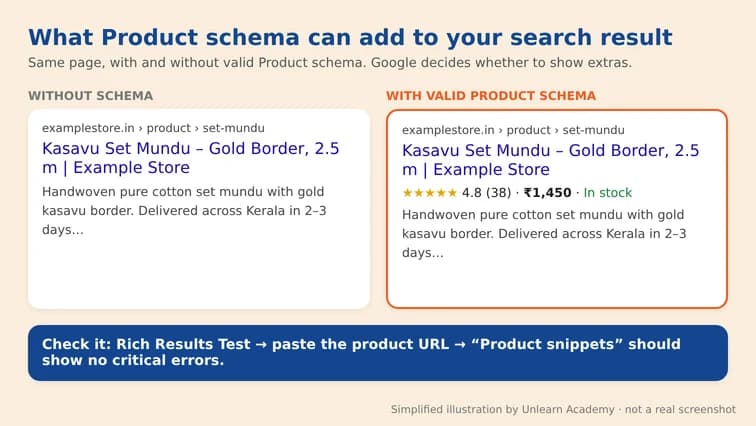
A product search result with and without Product schema extras like rating, price and stock. Simplified illustration by Unlearn Academy, not a real screenshot. - 2
Test one product in the Rich Results Test (SOP 317). Fix missing price, availability or brand.
- 3
Images: descriptive file names (gold-border-set-mundu.jpg), alt text describing the product, compressed to under 200 KB (SOP 217).
- 4
Turn on product reviews and ask buyers for them; review stars can appear in search results.
Stage 3
Category pages
- 1
Add a 100–200 word intro to each main category: what’s in it, who it’s for, buying tips. Place it above or below the products.
- 2
Give categories a clear SEO title, for example “Kerala Set Mundu – Buy Online | Store Name”.
- 3
Link categories to each other and to buying guides (SOP 216).
Stage 4
Control filters and stock changes
- 1
Filter and sort URLs (?orderby=, ?filter_colour=) should be noindexed or canonicalised to the main category. Check your filter plugin’s SEO settings.
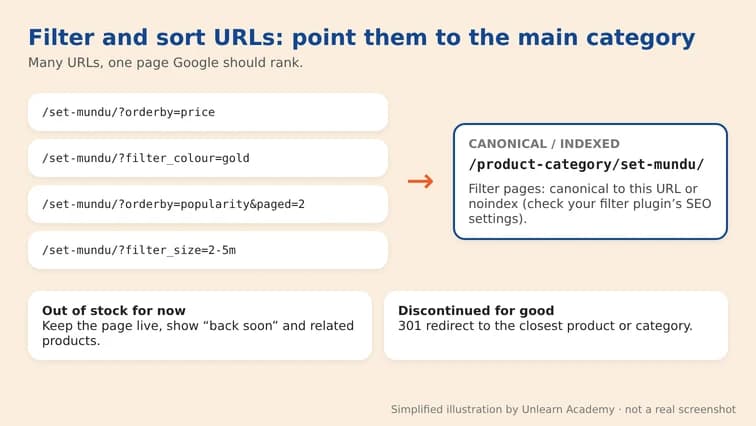
Filter and sort URLs pointing to the main category URL as canonical. Simplified illustration by Unlearn Academy, not a real screenshot. - 2
Temporarily out of stock: keep the page live, show “back soon” and related products.
- 3
Permanently discontinued: 301 redirect to the closest product or category (SOP 316), especially if the page had traffic or links.
Practice & check
Now do it for real
Reading is not doing. Open your own account and complete this task before you move on.
Practice task (5 min)
Rewrite the title, SEO title, description and image alt text for 3 products of a sample store and test one in the Rich Results Test.
Prove it
Two questions. Get both right and this SOP is done.
Common questions
Which SEO plugin is best for WooCommerce?
Rank Math, Yoast (with its WooCommerce add-on), AIOSEO and SEOPress all handle product schema. Choose one and configure it fully; don’t run two.
Should I noindex WooCommerce tag pages?
Usually yes, unless a tag page has unique content and gets search traffic. Most tag archives are thin duplicates of categories.
How do I get review stars in Google for products?
Collect genuine reviews, output them in Product schema through your SEO plugin, and pass the Rich Results Test. Google decides whether to show them.
Done. That’s a real skill, not a certificate.
Next: SOP 339 — Find New Content Ideas from Competitors and Real Questions →
Want to do this on real client budgets, with a mentor checking your work? That’s Level 2 at Unlearn. See the Digital Marketing track