The short answer
To run click-to-WhatsApp ads, link your WhatsApp Business number to your Facebook Page, create a campaign with the Engagement or Leads objective, set the conversion location to Messaging apps → WhatsApp, and write a pre-filled opening message. Answer chats fast, label real leads in WhatsApp Business, and log them in your CRM, because “messaging conversations started” is not the same as a lead.
Before you start
By the end of this SOP
A live click-to-WhatsApp campaign, a fast-reply routine and a weekly count of real WhatsApp leads in the CRM.
- Time
- 30–45 minutes
- You’ll need
- A WhatsApp Business app or WhatsApp Business Platform number, a Facebook Page and ad account (SOP 010).
- Who does this
- The Meta Ads manager and the person or team who replies on WhatsApp.
About this SOP: why it matters, where and when
Why it matters: WhatsApp chats feel personal and convert well for high-trust purchases like courses, clinics and real estate.
Where: Facebook Page settings, Meta Ads Manager and the WhatsApp Business app.
When: When your customers prefer to ask questions before buying and someone can reply within minutes.
Stage 1
Connect WhatsApp to your Page
- 1
On the Facebook Page, open Settings → Linked accounts → WhatsApp and connect your WhatsApp Business number. Confirm with the code sent to WhatsApp.
- 2
In the WhatsApp Business app, set a business profile, greeting message, away message and quick replies for common questions (fees, dates, location).
- 3
Create labels such as New lead, Qualified, Visit booked, Enrolled.
Stage 2
Create the campaign
- 1
In Ads Manager, choose the Engagement objective (conversations) or Leads, then set Conversion location to Messaging apps and choose WhatsApp.
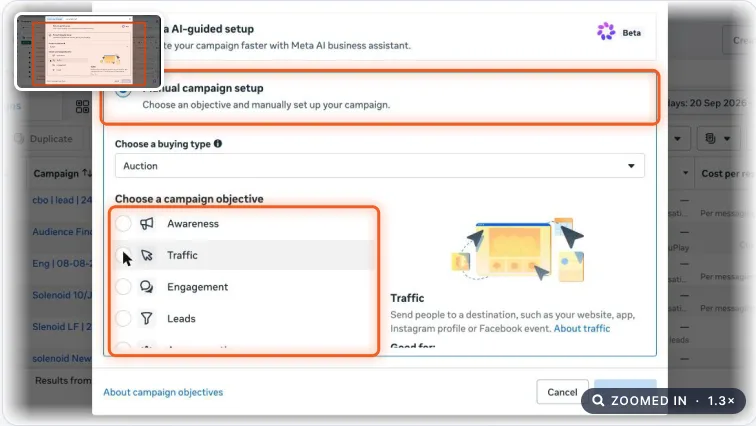
Meta Ads campaign objective choices. Real screenshot, Oct 2026. - 2
Set location, age and budget as for any lead campaign. Schedule ads for hours when someone can reply, if possible.
- 3
In the ad, write the creative and choose a message template with a pre-filled first message, for example “Hi, I’d like the fee details for the digital marketing course.”
- 4
Add 3–4 quick question buttons (Fees? Next batch? Location? Placement?) so people can start with one tap.
Stage 3
Reply fast and qualify
- 1
Reply within 5 minutes during working hours. A chat answered hours later rarely becomes a customer.
- 2
Ask 2 qualifying questions in the first few messages (course or service, when they want to start).
- 3
Label each chat. Move serious leads to a call or visit and log them in the CRM with source = WhatsApp ad (SOP 330).
Stage 4
Measure real leads
- 1
Ads Manager reports “Messaging conversations started”. That counts chats, not leads.
- 2
Weekly, count chats labelled New lead or better, and calculate real cost per lead: spend × 1.18 ÷ real leads.
- 3
If you use the WhatsApp Business Platform with a CRM, send qualified-lead events back to Meta through the Conversions API, so ads can optimise for real leads.
Note
Don’t send WhatsApp chat starts to Meta as Lead events from your website. A chat start is Contact, not Lead.
Practice & check
Now do it for real
Reading is not doing. Open your own account and complete this task before you move on.
Practice task (5 min)
Write the pre-filled message, 4 quick question buttons, greeting and away messages, and a 3-question qualifying script for a sample clinic’s WhatsApp ads.
Prove it
Two questions. Get both right and this SOP is done.
Common questions
Do I need the WhatsApp Business API for click-to-WhatsApp ads?
No. The free WhatsApp Business app works. The Business Platform (API) helps when several people reply or you want CRM integration and automation.
Why are my WhatsApp ad results high but sales low?
Usually slow replies, no qualifying questions, or counting chats started as leads. Track labelled leads and response time.
Which objective should I use for WhatsApp ads?
Engagement with WhatsApp as the conversion location is the common start. Leads objective with WhatsApp works well once you send qualified-lead events back to Meta.
Done. That’s a real skill, not a certificate.
Next: SOP 329 — Set Up an Advantage+ Sales Campaign for an Online Store →
Want to do this on real client budgets, with a mentor checking your work? That’s Level 2 at Unlearn. See the Digital Marketing track