The short answer
To set up an Advantage+ sales campaign, make sure Purchase events with value arrive from pixel and Conversions API, then create a Sales campaign with Advantage+ turned on. Define your existing customers in ad account settings (customer lists, website buyers) and, if you want, cap the budget share for them. Add 10 or more varied creatives or a product catalog, set a daily budget, and judge on real ROAS from your store, not only Ads Manager.
Before you start
By the end of this SOP
A live Advantage+ sales campaign with clean purchase tracking, an existing-customer setting and 10+ creatives.
- Time
- 30–45 minutes
- You’ll need
- An online store with Purchase tracking through pixel and CAPI (SOP 326), ideally a product catalog, and at least ₹1,500–₹3,000 daily budget.
- Who does this
- The Meta Ads manager for an e-commerce store.
About this SOP: why it matters, where and when
Why it matters: For many stores, Advantage+ sales finds buyers more cheaply than manually targeted campaigns, with less setup.
Where: Meta Ads Manager and ad account settings.
When: Once the store has steady purchase tracking (ideally 50+ purchases a month).
Stage 1
Check the foundations
- 1
In Events Manager, check Purchase arrives from Browser and Server with value and currency (SOP 326).
- 2
Compare last week’s purchases in Events Manager with your store’s orders. A big gap means fix tracking first.
- 3
In ad account settings, open Audience segments and set your existing customers: a customer list and website purchasers. This lets Meta report new vs returning buyers.
Stage 2
Create the campaign
- 1
In Ads Manager, click + Create, choose Sales and keep Advantage+ on (the setup panel shows the Advantage+ settings in use).
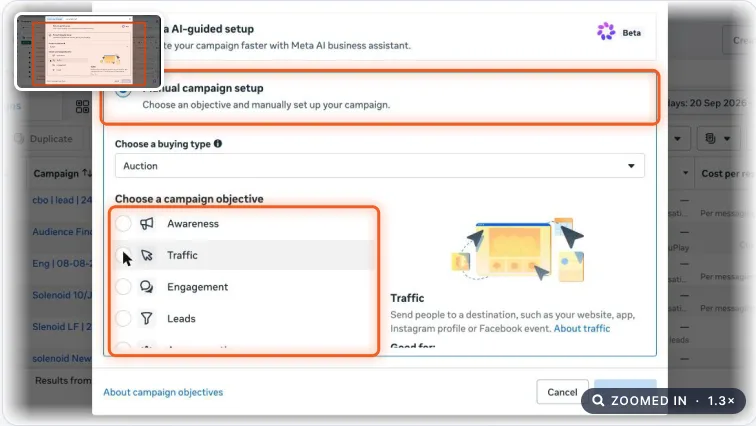
Meta Ads campaign objective choices. Real screenshot, Oct 2026. - 2
Choose your dataset and Purchase as the conversion event. Set location to the countries or regions you deliver to.
- 3
Optional: set a cap on the share of budget spent on existing customers (for example 20%) if you want the campaign to focus on new buyers.
- 4
Set a daily budget. Avoid changing it by more than 20–30% at a time once it is learning.
Stage 3
Feed it creative
- 1
Add 10 or more creatives that are genuinely different: product reels, customer UGC, static offers, carousels, before-and-after.
- 2
If you have a catalog, add catalog ads so Meta can show the products each person is most likely to buy.
- 3
Use clear, honest offers and prices. Keep creatives fresh every 2–4 weeks (SOP 327).
Stage 4
Judge it properly
- 1
Give it 2–3 weeks before big judgements; Advantage+ needs data to learn.
- 2
Compare Ads Manager revenue with store revenue for the same period, and look at new vs existing customer split.
- 3
Check real ROAS against your break-even ROAS (1.18 ÷ margin %). Use the free ROAS calculator for the maths.
Practice & check
Now do it for real
Reading is not doing. Open your own account and complete this task before you move on.
Practice task (5 min)
For a sample store, write the setup checklist: tracking check, existing customer definition, budget cap decision, 10 creative ideas and the break-even ROAS.
Prove it
Two questions. Get both right and this SOP is done.
Common questions
What is the difference between Advantage+ shopping and Advantage+ sales?
It’s the same idea under a new name. Meta renamed Advantage+ shopping campaigns to Advantage+ sales campaigns as part of a unified Sales setup.
Do I need a catalog for Advantage+ sales?
No, but a catalog helps stores with many products show the right ones to each person.
How much budget does Advantage+ sales need?
Enough for several purchases a day. Many Indian stores start at ₹1,500–₹3,000 per day; less can work but learns slowly.
Done. That’s a real skill, not a certificate.
Want to do this on real client budgets, with a mentor checking your work? That’s Level 2 at Unlearn. See the Digital Marketing track