The short answer
To track forms that don’t redirect to a thank-you page, listen for the form plugin’s success event in GTM. Contact Form 7 fires a wpcf7mailsent event; Elementor Pro forms fire submit_success. Add a Custom HTML listener tag that pushes a dataLayer event (for example form_success), trigger your GA4 generate_lead, Google Ads conversion and Meta Lead tags on that event, then test a real submission.
Before you start
By the end of this SOP
Only successful form submissions fire GA4, Google Ads and Meta conversion tags, once each.
- Time
- 30–45 minutes
- You’ll need
- GTM on the site (SOP 004), GA4 (SOP 009), Google Ads conversion action (SOP 025) and Meta Pixel (SOP 005).
- Who does this
- The person managing tracking.
About this SOP: why it matters, where and when
Why it matters: Generic form triggers fire on failed or empty submissions, inflating leads and misleading Smart Bidding.
Where: tagmanager.google.com and the website.
When: When a form shows an on-page success message instead of a thank-you page.
Stage 1
Add the success listener
- 1
Contact Form 7: in GTM, create a Custom HTML tag with a listener for the wpcf7mailsent event that pushes dataLayer.push({event: 'form_success', form_id: event.detail.contactFormId}). Fire it on All Pages (or pages with forms).
Tip
wpcf7mailsent fires only after the email is actually sent, so failed or invalid submissions are not counted.
- 2
Elementor Pro forms: use a Custom HTML tag with jQuery(document).on('submit_success', …) that pushes the same form_success event (plus the form name if available).
- 3
Other form plugins (WPForms, Gravity Forms, Fluent Forms): check their documentation for a JavaScript success event, or use their redirect-to-thank-you option instead.
Stage 2
Create the trigger and tags
- 1
Triggers → New → Custom Event, event name form_success.
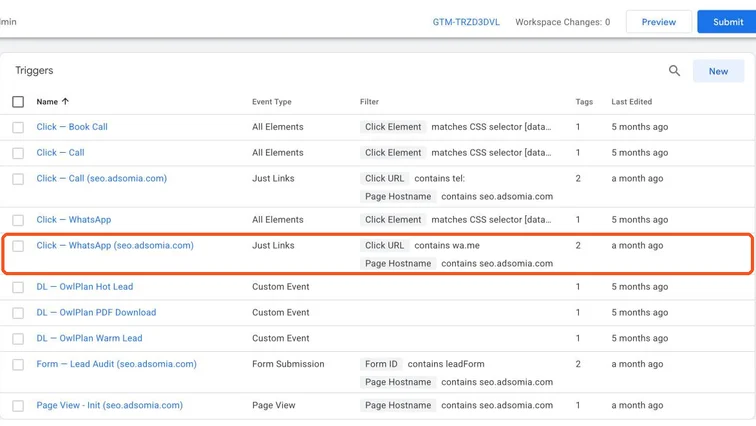
GTM triggers list including Custom Event triggers. Real screenshot, Oct 2026. - 2
GA4 Event tag: event name generate_lead, with a form_id parameter, on that trigger.
- 3
Google Ads Conversion Tracking tag with your lead conversion ID and label, on the same trigger. Turn on enhanced conversions if you collect email or phone.
- 4
Meta Lead event on the same trigger (with event_id if you also use CAPI).
Stage 3
Test properly
- 1
Open GTM Preview, submit the form with valid details. Check form_success appears once and all three tags fire.
- 2
Submit with a required field empty. No tags should fire.
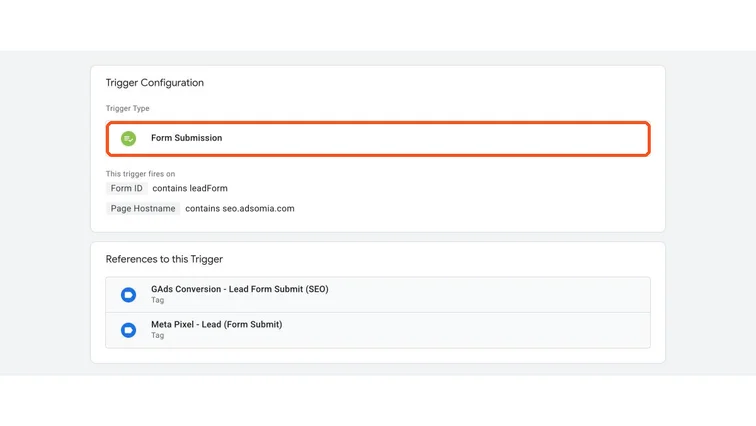
A generic GTM Form Submission trigger, the setup this guide replaces for AJAX forms. Real screenshot, Oct 2026. - 3
Publish, then check GA4 DebugView, Google Ads conversion status and Meta Test Events.
- 4
After a week, compare conversions with the form entries or CRM leads.
Practice & check
Now do it for real
Reading is not doing. Open your own account and complete this task before you move on.
Practice task (5 min)
On a test WordPress site with Contact Form 7, set up the wpcf7mailsent listener and show in GTM Preview that a valid submission fires the tags and an invalid one doesn’t.
Prove it
Two questions. Get both right and this SOP is done.
Common questions
Can I track Contact Form 7 without GTM?
Yes, with plugins that add GA4 events, but GTM lets you send the same event to GA4, Google Ads and Meta consistently.
Should I add a thank-you page instead?
A thank-you page is the simplest and most reliable method. Use the success-event method when the design or plugin doesn’t allow a redirect.
Why do my form conversions double?
Usually the listener tag fires twice (two triggers) or the Meta and GA4 tags are also hard-coded. Check in GTM Preview.
Done. That’s a real skill, not a certificate.
Next: SOP 338 — Measure Leads and Sales from Organic Search in GA4 →
Want to do this on real client budgets, with a mentor checking your work? That’s Level 2 at Unlearn. See the Digital Marketing track