The short answer
To measure organic search leads in GA4, open Reports → Acquisition → Traffic acquisition, filter Session primary channel group to Organic Search, and choose your lead key event in the Key events column. Then open the Landing page report with the same filter to see which pages bring leads, and save an exploration with landing page, key events and revenue for monthly SEO reports.
Before you start
By the end of this SOP
A saved GA4 view of organic sessions, leads and revenue by landing page, used in every SEO report.
- Time
- 20–30 minutes
- Who does this
- The SEO specialist or whoever reports on marketing.
About this SOP: why it matters, where and when
Why it matters: Clicks don’t pay salaries. Showing leads from organic search proves the value of SEO and shows which pages to improve.
Where: GA4 Reports and Explore.
When: Monthly for SEO reports, and after major content changes.
Stage 1
See organic leads overall
- 1
In GA4, open Reports → Acquisition → Traffic acquisition (or Business objectives → Generate leads → Traffic acquisition).
- 2
Keep the dimension Session primary channel group and find the Organic Search row.
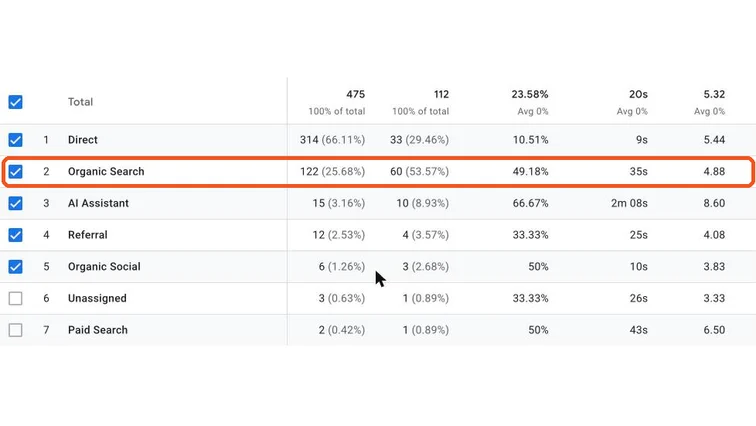
GA4 Traffic acquisition with the Organic Search row highlighted. Real screenshot, Oct 2026. - 3
In the Key events column, choose the lead event (for example generate_lead). Compare with the previous period.
Stage 2
Find the pages that bring leads
- 1
Open Reports → Engagement → Landing page (or Business objectives → Landing page).
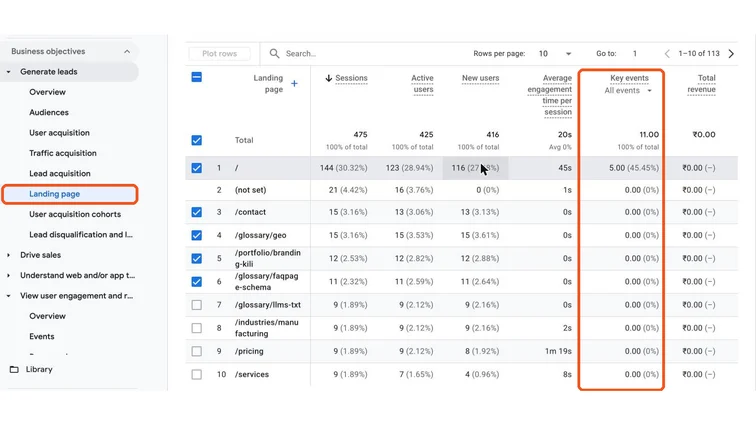
GA4 Landing page report with the Key events column. Real screenshot, Oct 2026. - 2
Add a filter: Session primary channel group exactly matches Organic Search.
- 3
Sort by Key events. These pages deserve updates, internal links and protection from changes.
- 4
Pages with many organic sessions but few leads need a clearer call to action or offer.
Stage 3
Save an organic report
- 1
Explore → Free form. Dimensions: Landing page + query string, Session primary channel group. Metrics: Sessions, Key events, Total revenue.
- 2
Add a filter for Organic Search and drag Landing page to Rows.
- 3
Name it “Organic leads by page” and use it in the monthly SEO report (SOP 321).
- 4
Add Search Console data (Queries report) to see which searches lead to those pages.
Practice & check
Now do it for real
Reading is not doing. Open your own account and complete this task before you move on.
Practice task (5 min)
Build the “Organic leads by page” exploration for a site you manage and list the top 5 pages by organic leads.
Prove it
Two questions. Get both right and this SOP is done.
Common questions
Why do organic leads in GA4 not match my CRM?
Consent, ad blockers and attribution differ. Use GA4 for trends and pages, and the CRM (with lead source) for the real count.
Can GA4 show which keywords brought leads?
Not directly for Google organic traffic. Link Search Console to see queries per landing page, then connect pages to leads.
What is a good conversion rate for organic traffic?
It varies by page type. Service pages often convert at 2–5%, blog posts much lower. Compare pages against each other.
Done. That’s a real skill, not a certificate.
Want to do this on real client budgets, with a mentor checking your work? That’s Level 2 at Unlearn. See the Digital Marketing track