The short answer
To optimise an Instagram business profile, switch to a professional (Business) account, use a recognisable profile photo, put your main keyword and city in the name field, write a bio that says what you do, for whom and what to do next, add contact and WhatsApp buttons, add links with UTM tags, pin your three best posts, and organise highlights for services, reviews, prices and FAQs.
Before you start
By the end of this SOP
A profile that explains the business in 5 seconds and makes it easy to enquire.
- Time
- 45 minutes
- You’ll need
- An Instagram account, a Facebook Page or Meta business portfolio (for ads), and your WhatsApp Business number.
- Who does this
- The social media manager or business owner.
About this SOP: why it matters, where and when
Why it matters: A clear profile turns reel viewers into followers and enquiries.
Where: Instagram app → Edit profile and Professional dashboard.
When: When starting, and every quarter.
Stage 1
Switch and connect
- 1
Settings → Account type and tools → Switch to professional account → Business, and choose the right category.
- 2
Connect the account to your Facebook Page and Meta business portfolio (SOP 010) so you can run ads and see insights.
Stage 2
Write the profile
- 1
Username: your brand, simple to spell. Name field (searchable): brand + keyword + city, for example “Glow Skin Clinic | Kochi”.
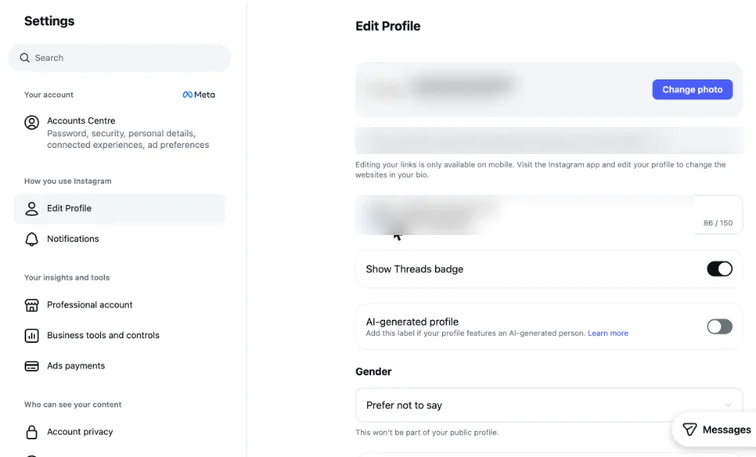
Instagram Edit profile settings with Professional account and Business tools in the menu (account details blurred). Real screenshot, Oct 2026. - 2
Bio, 3 lines: what you do and for whom, proof (years, clients, rating), and the next step (“Book a free consultation 👇”).
- 3
Add contact options: phone, email, WhatsApp button and address if you have a location.
- 4
Links (edit them in the Instagram mobile app; desktop doesn’t allow it): add up to 5 links, each with UTM tags (use the free UTM builder) so you can see Instagram traffic in GA4.
Stage 3
Arrange highlights and pinned posts
- 1
Create 4–6 highlights: Services, Prices or Packages, Reviews, Results, FAQs, Location. Use simple covers in brand colours.
- 2
Pin 3 posts: your best introduction reel, a customer result and an offer or how-to-book post.
Stage 4
Check monthly
- 1
Professional dashboard → Insights: profile visits, link taps and contact button taps.
- 2
If profile visits are high but taps are low, rewrite the bio and pinned posts.
- 3
Reply to DMs within hours; set saved replies and FAQs for common questions.
Practice & check
Now do it for real
Reading is not doing. Open your own account and complete this task before you move on.
Practice task (5 min)
Rewrite the bio of a local business you know in 3 lines and suggest 5 highlight names.
Prove it
Two questions. Get both right and this SOP is done.
Common questions
Business or Creator account?
Business suits most companies (contact buttons, shops, ads). Creator suits individuals and influencers.
How many links can I add to an Instagram bio?
Up to 5 links.
Should I use a link-in-bio tool?
Only if you need more than 5 links. Tag each link with UTMs either way.
Done. That’s a real skill, not a certificate.
Next: SOP 347 — Set Up a Brand Kit and Templates in Canva →
Want to do this on real client budgets, with a mentor checking your work? That’s Level 2 at Unlearn. See the Digital Marketing track