The short answer
To set up a brand kit in Canva, open Brand (Brand Kit) from the home page, upload your logos, add your brand colours as hex codes and set fonts for headings and body text. Then build a set of templates for feed posts, reel covers, stories, highlight covers and ads using those styles, save them as brand templates, and share the team folder with everyone who designs.
Before you start
By the end of this SOP
A Canva brand kit and 6–8 reusable templates shared with the team.
- Time
- 60 minutes
- You’ll need
- Canva (Pro or Teams for full brand kit features), your logo files and brand colours.
- Who does this
- The designer or social media manager.
About this SOP: why it matters, where and when
Why it matters: Consistent design makes a brand recognisable and saves hours on every post and ad.
Where: Canva (canva.com) → Brand.
When: At the start of a brand or client project.
Stage 1
Collect brand basics
- 1
Collect logos as PNG with transparent background: full logo, icon only, white and dark versions.
- 2
Choose 2–3 main colours and 2 neutral colours, with hex codes (for example #0035AB).
- 3
Choose one heading font and one body font that support the languages you use (English and Malayalam if needed).
Stage 2
Create the brand kit
- 1
Canva home → Brand → create a brand kit (Canva Pro and Teams unlock full brand kits).
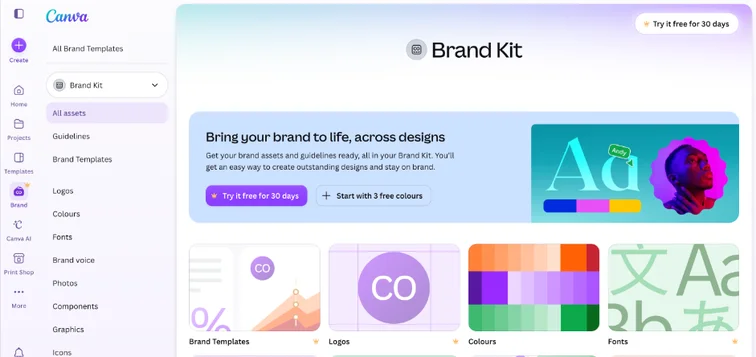
Canva Brand Kit page with logos, colours, fonts and brand templates. Real screenshot, Oct 2026. - 2
Upload logos, add colour palettes and set fonts for title, subtitle and body.
- 3
Add brand photos and graphics (team, location, products) so designers use real images.
Stage 3
Build templates
- 1
Create templates: feed post (4:5), carousel, reel cover (9:16), story, highlight cover, ad image (1:1 and 9:16), and a testimonial card.
- 2
Keep text areas consistent: headline zone, logo position, call to action style.
- 3
Leave safe margins on 9:16 designs so text isn’t hidden by Instagram buttons.
- 4
Publish them as brand templates and add short naming: “IG-Post-Offer”, “Reel-Cover-Tip”.
Stage 4
Share and control
- 1
Put templates in a shared team folder; give clients view or edit access as agreed.
- 2
Turn on brand controls (on Teams) so only brand colours and fonts are used.
- 3
Review templates every quarter and retire tired designs.
Practice & check
Now do it for real
Reading is not doing. Open your own account and complete this task before you move on.
Practice task (5 min)
Create a brand kit and three templates (post, reel cover, story) for a sample café.
Prove it
Two questions. Get both right and this SOP is done.
Common questions
Is the Canva brand kit free?
Canva Pro and Teams include full brand kits; the free plan has limited brand features.
Can I share a brand kit with a client?
Yes, through a Canva team. Many agencies create one team per client.
Where do I get brand colours if a client has none?
Take them from the logo with Canva’s colour picker, then add one accent and neutrals.
Done. That’s a real skill, not a certificate.
Next: SOP 348 — Create and Optimise a LinkedIn Company Page →
Want to do this on real client budgets, with a mentor checking your work? That’s Level 2 at Unlearn. See the Digital Marketing track