The short answer
To create a LinkedIn company page, go to LinkedIn → For Business → Create a Company Page, choose Company, and add the name, URL, website, industry, size and logo. Then write a keyword-rich About section, add a banner and a custom button, give admin access to at least two people, ask employees to list the company in their experience, and post 2–3 times a week.
Before you start
By the end of this SOP
A complete LinkedIn page with admins, linked employees and a posting plan.
- Time
- 45 minutes
- You’ll need
- A personal LinkedIn profile (with a real name and some history), your logo, banner and website.
- Who does this
- The founder, marketing lead or social media manager.
About this SOP: why it matters, where and when
Why it matters: A complete page builds trust, shows in Google results for your brand, and supports hiring and B2B sales.
Where: LinkedIn (linkedin.com) → For Business → Create a Company Page.
When: When launching a business, or when the current page is incomplete.
Stage 1
Create the page
- 1
LinkedIn → For Business (grid icon) → Create a Company Page → Company (or Showcase page for a sub-brand, Educational institution for schools).
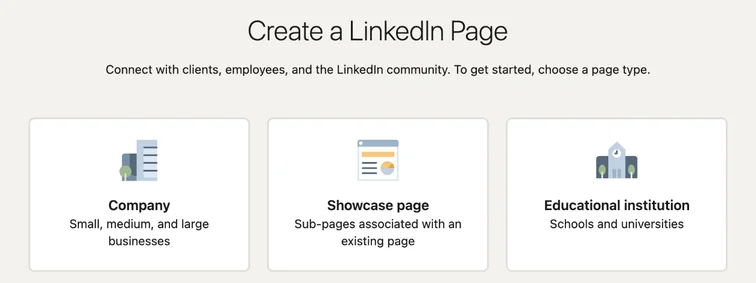
LinkedIn Create a LinkedIn Page screen with Company, Showcase page and Educational institution. Real screenshot, Oct 2026. - 2
Add name, a clean public URL, website, industry, company size and type, and the logo (300 × 300 px).
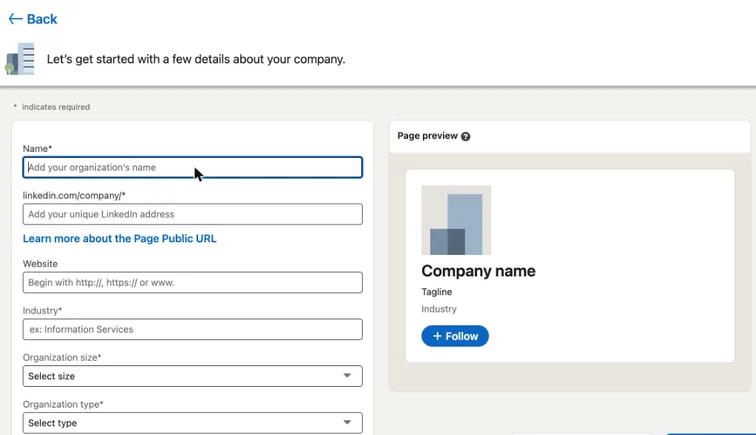
LinkedIn company page form with name, public URL, website, industry, size and type, and a live page preview. Real screenshot, Oct 2026. - 3
Confirm you have authority to create the page and publish.
Stage 2
Optimise the page
- 1
About (up to 2,000 characters): what you do, for whom, where, proof and services. Use the words clients search, such as “digital marketing agency in Kochi”.
- 2
Banner (1128 × 191 px): one clear message, not a collage.
- 3
Custom button: Visit website or Contact us, with a UTM-tagged link.
- 4
Add locations, specialities (up to 20) and a hashtag set relevant to your industry.
Stage 3
Admins and employees
- 1
Admin tools → Manage admins: add at least two people from the business as Super admin; give agencies Content admin.
- 2
Ask employees to add the company to their Experience so they appear under People.
- 3
Invite relevant connections to follow the page (you get a monthly invite allowance).
Stage 4
Post and measure
- 1
Post 2–3 times a week: case studies, team and culture, insights and job posts.
- 2
Founders’ personal posts usually reach more people; reshare them on the page.
- 3
Analytics: check followers, impressions, engagement rate and visitor job functions monthly.
Practice & check
Now do it for real
Reading is not doing. Open your own account and complete this task before you move on.
Practice task (5 min)
Write a 200-word LinkedIn About section for a digital marketing agency, including location, services and proof.
Prove it
Two questions. Get both right and this SOP is done.
Common questions
Can I create a LinkedIn page without a personal profile?
No. You need a personal profile with some history to create and manage a page.
How often should a company page post?
2–3 times a week is a good start for small businesses.
Should agencies run LinkedIn ads?
For B2B with clear job titles and good deal sizes, yes; for most local consumer businesses, Meta and Google work better.
Done. That’s a real skill, not a certificate.
Next: SOP 043 — Do a Social Media Audit (Yours and Your Competitors’) →
Want to do this on real client budgets, with a mentor checking your work? That’s Level 2 at Unlearn. See the Digital Marketing track