The short answer
To post on a Google Business Profile, open the profile on Google Search or Maps, click Posts → “Add post”, and choose Update, Offer or Event. Add a real photo, a short message with the key detail first, and a button such as Call, Book or Learn more with a UTM-tagged link. Post at least a couple of times a month.
Before you start
By the end of this SOP
A regular posting habit with tracked clicks.
- Time
- 10 minutes per post
- Who does this
- The marketer or business owner.
About this SOP: why it matters, where and when
Why it matters: Posts appear on the profile in Search and Maps, and can tip a searcher into calling.
Where: In Google Search or the Google Maps app, signed in as manager.
When: At least twice a month, plus for every offer, event or new batch.
Stage 1
Choose the post type
- 1
Pick one:
- Update: news, tips, new batch starting, behind the scenes.
- Offer: a deal with start and end dates, and terms.
- Event: a workshop, open day or seminar with date and time.
Stage 2
Write and publish
- 1
Open the profile on Google Search while signed in, click Posts → “Add post”, and choose Update, Offer or Event.
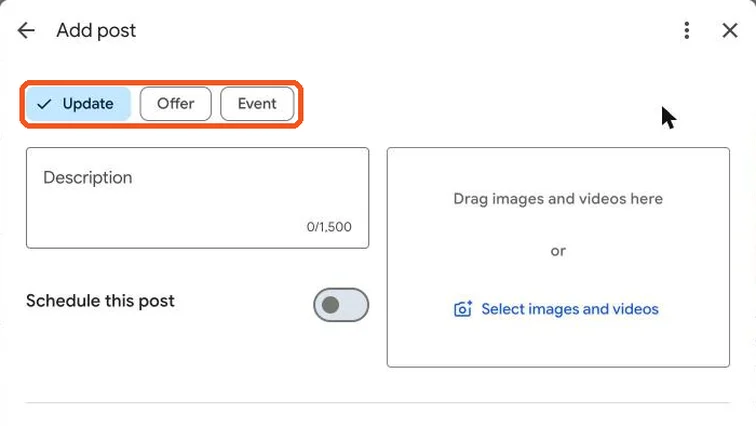
Add post window with the Update, Offer and Event options highlighted. Real screenshot, Oct 2026. - 2
Add a real, bright photo. Crop so the subject is in the centre; Google may crop edges.
- 3
Write 1–3 short sentences. Put the key detail first: what, when, for whom.
- Example: “New Digital Marketing batch starts 3 Nov in Trivandrum. Weekend option available. Book a free counselling call.”
- 4
Add a button (Book, Call, Learn more, Sign up) and a link with UTM tags (utm_campaign=gbp-post).
- 5
Preview and publish. Posts can take a short while to appear after Google’s review.
Watch out
Don’t include phone numbers in the text; use the Call button. Posts with phone numbers or misleading claims may be rejected.
Agency playbook
Doing this for a paying client
What a senior checks before calling the job done. Numbers are starting rules; compare them with the account’s own history.
What good looks like
- Every post has a real, recent photo of this location. No stock images, no text-heavy flyers that Google may reject.
- The first line works alone, because Search and Maps often cut the rest. What, when, where, for whom.
- Offers have real end dates, and expired offers are replaced on time, not left showing old prices.
- Every button link carries UTM (Urchin Tracking Module) tags, so GA4 shows visits and enquiries from each post.
- Post claims match the website and the front desk. If a post says ₹4,999, staff quote ₹4,999.
Mistakes we see on real accounts
- Copying the Instagram caption with hashtags and emojis. It reads like spam on Maps and gets fewer clicks.
- Putting a phone number or WhatsApp link in the text. The post is rejected and the slot is wasted.
- Posting “Best digital marketing course in Kerala” claims. Misleading or unverifiable wording can get posts removed.
- Using posts to stuff keywords or city names. It doesn’t help ranking and can attract a profile review.
- Letting a festival offer run past its date. Customers call for a deal that no longer exists.
Agency checklist before you call it done
- The client is the primary owner of the profile. The agency is a manager, never the only owner.
- Facts in the post, such as dates, prices and seats, were confirmed by the client in writing.
- Screenshot of each live post is saved in the client folder with its publish date.
- Any rejected post is logged with the reason and how you fixed it.
- Post is added to the content calendar with its UTM campaign name for later reporting.
- Monthly report shows calls, direction requests and website clicks around posting dates, not just “4 posts published”.
Handover message to the client
Hi [Client name], this month we published [number] posts on your Google profile, including [best post]. They brought [clicks/calls] from Google. Next month we plan [topics]. Please share any offers, events or new photos by [date].
Senior tip
Use Event posts for real open days and admission dates. Their dates stay visible on the profile, and you can tie calls on those days back to the event.
Practice & check
Now do it for real
Reading is not doing. Open your own account and complete this task before you move on.
Practice task (5 min)
Write one Update, one Offer and one Event post for a real local business, each with a photo idea, button and UTM link.
Prove it
Two questions. Get both right and this SOP is done.
Common questions
Do Google Business Profile posts help ranking?
Their main value is getting clicks and calls and showing the business is active. Treat them as a conversion tool, not a ranking trick.
How often should I post on Google Business Profile?
At least twice a month, plus every time there’s an offer, event or something new.
Done. That’s a real skill, not a certificate.
Next: SOP 205 — Track Google Business Profile Performance →
Want to do this on real client budgets, with a mentor checking your work? That’s Level 2 at Unlearn. See the Digital Marketing track