The short answer
To track Google Business Profile performance, open the profile while signed in and click Performance. Review interactions (calls, direction requests, website clicks, bookings), views on Search and Maps, and the search terms people used to find you. Compare month on month, add website visits from GA4 using your UTM tags, and pick one or two actions for next month.
Before you start
By the end of this SOP
A monthly snapshot of profile results and next actions.
- Time
- 20–30 minutes a month
- Who does this
- The marketer reporting to the client.
About this SOP: why it matters, where and when
Why it matters: Calls and directions are real leads. Measuring them shows the value of local SEO.
Where: In Business Profile Performance and GA4.
When: Monthly, in the first week of the month.
Stage 1
Read Performance
- 1
Search the business name while signed in, then click Performance. Set the Time period (it shows up to 6 months at a time).
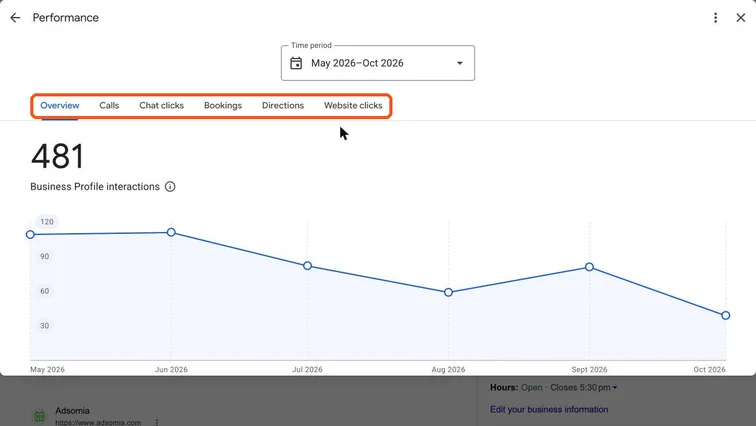
Performance panel with the Overview, Calls, Chat clicks, Bookings, Directions and Website clicks tabs highlighted. Real screenshot, Oct 2026. - 2
Write down:
- Interactions: calls, chat clicks, bookings, direction requests and website clicks.
- Profile views, split by Search and Maps, mobile and desktop.
- Searches: the top terms people used to find the profile.
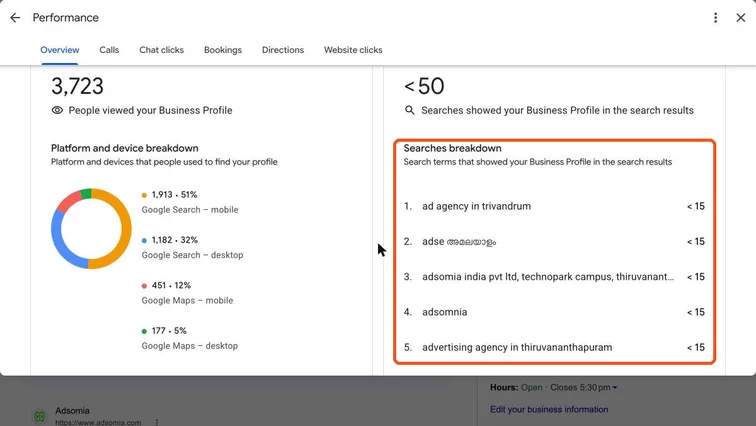
Performance panel showing people who viewed the profile by platform and the Searches breakdown highlighted. Real screenshot, Oct 2026. - 3
Compare with the previous month and the same month last year (seasons matter, e.g. admissions or festival periods).
Note
Numbers can take a few days to appear, and small counts swing a lot. Look at trends over 3+ months.
Stage 2
Add website and lead data
- 1
In GA4 → Traffic acquisition, filter by session campaign “gbp” (and “gbp-post”) to see visits and key events from the profile.
- 2
Ask the client how many calls and walk-ins mentioned Google. Add them to the report.
Stage 3
Decide next actions
- 1
Use the numbers to pick actions:
- Searches mostly brand name? Improve categories, services and description so you show up for service searches.
- Views up but few calls? Improve photos, reviews and the offer in posts.
- Website clicks but no leads? Fix the landing page.
- 2
Add a short section to your monthly client report.
Practice & check
Now do it for real
Reading is not doing. Open your own account and complete this task before you move on.
Practice task (5 min)
Build a one-page monthly GBP report template with interactions, top searches, GA4 visits and two next actions.
Prove it
Two questions. Get both right and this SOP is done.
Common questions
Where are Google Business Profile insights?
Search your business name on Google while signed in as a manager and click Performance.
Why don’t GBP numbers match GA4?
They measure different things. GBP counts profile actions (calls, directions, clicks); GA4 counts website visits that actually loaded and were tracked.
Done. That’s a real skill, not a certificate.
Want to do this on real client budgets, with a mentor checking your work? That’s Level 2 at Unlearn. See the Digital Marketing track