The short answer
To optimise a Google Business Profile, fill in every section: the most accurate primary category plus relevant secondary ones, exact hours (including holidays), services or products with descriptions, a clear 750-character description, attributes, and the right phone and website with UTM tags. Add a logo, cover photo and real photos of the place, team and work, and keep them fresh.
Before you start
By the end of this SOP
Every relevant section is filled in, with fresh photos and tracked website clicks.
- Time
- 45–60 minutes, then 10 minutes a month
- You’ll need
- A verified profile (SOP 201) and good photos of the business.
- Who does this
- The marketer or business owner.
About this SOP: why it matters, where and when
Why it matters: Google ranks local results on relevance, distance and prominence. Complete, accurate info improves relevance and conversions.
Where: In Google Search or the Google Maps app, signed in as the profile manager.
When: Right after verification, then a quick review every month.
Stage 1
Fill in the business info
- 1
Search the business name on Google while signed in. The “Your business on Google” panel appears; click “Edit profile”. (On a phone, use the Google Maps app.)
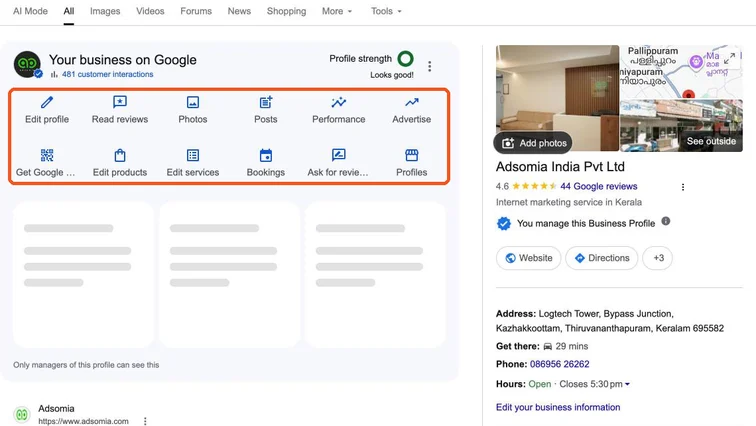
Your business on Google panel in Google Search with Edit profile, Read reviews, Photos, Posts and Performance highlighted. Real screenshot, Oct 2026. - 2
Categories (About tab): keep the most specific primary category, then add secondary ones for other main services. Don’t add unrelated ones.
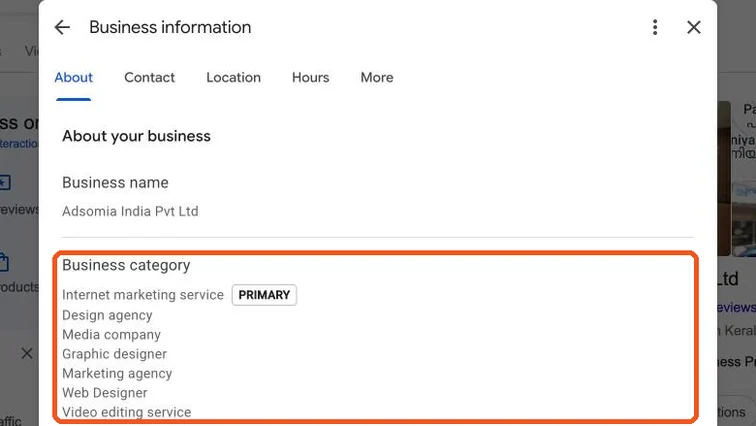
Business information About tab showing the primary category and secondary categories. Real screenshot, Oct 2026. - 3
Hours tab: regular hours, plus Special hours for holidays like Onam, Vishu and Christmas.
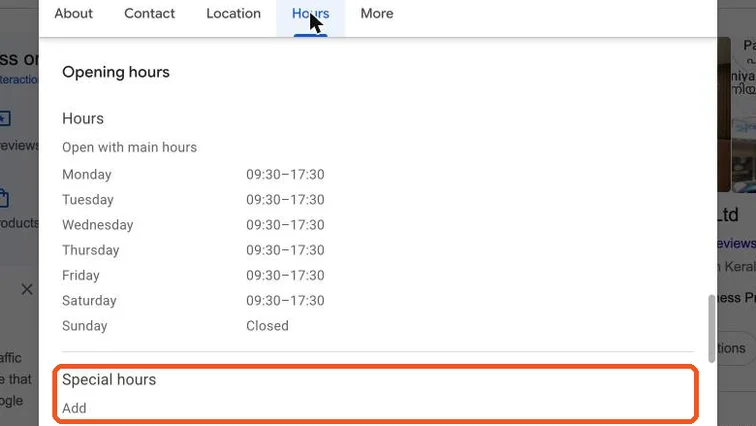
Business information Hours tab with the Special hours section highlighted. Real screenshot, Oct 2026. - 4
Description (up to 750 characters): what you do, who for, where, and what makes you different. The first 250 characters matter most.
- 5
Website link with UTM tags so GA4 can track profile clicks, e.g. ?utm_source=google&utm_medium=organic&utm_campaign=gbp.
Tip
Link to the most relevant page. A clinic with many branches should link each profile to its own branch page.
- 6
Services or products: add each one with a short description and price if you can.
- 7
Attributes: tick what’s true, e.g. wheelchair accessible, online classes, women-led, free Wi-Fi.
Stage 2
Add photos, logo and cover
- 1
Logo: square, clear on a small screen.
- 2
Cover photo: your best real photo of the business. Google may show other photos first, so add many good ones.
- 3
Add real photos (JPG or PNG, well lit, at least 720 × 720 px):
- Outside, so people recognise the place.
- Inside and the counter or reception.
- The team at work.
- Products, results or student work.
Watch out
Don’t use stock photos or heavy text graphics. They look fake and may be removed.
- 4
Add new photos every month. Fresh, real photos help people trust the business.
Stage 3
Keep it accurate
- 1
Check the profile monthly for “suggested edits” from Google or the public, and accept or reject them.
- 2
Update hours, phone and services as soon as they change. Wrong info loses customers and trust.
Practice & check
Now do it for real
Reading is not doing. Open your own account and complete this task before you move on.
Practice task (5 min)
Score a real local business’s profile out of 10 sections (categories, hours, holiday hours, description, website, services, attributes, logo, cover, photos). List the three biggest gaps.
Prove it
Two questions. Get both right and this SOP is done.
Common questions
How many categories should a Google Business Profile have?
One accurate primary category plus a few relevant secondary ones. Only add categories for services you actually offer.
Do photos help Google Business Profile ranking?
Real, recent photos help people choose you and show the business is active. Add new ones regularly.
Done. That’s a real skill, not a certificate.
Next: SOP 203 — Get More Google Reviews and Reply to Them →
Want to do this on real client budgets, with a mentor checking your work? That’s Level 2 at Unlearn. See the Digital Marketing track