The short answer
To get more Google reviews, copy the review link from your Business Profile (“Ask for reviews”) and send it to every customer after a good experience, by WhatsApp, SMS or a QR code at the counter. Reply to every review within two days, thank happy customers, and answer complaints calmly with a way to fix them. Never pay for reviews or only ask happy customers.
Before you start
By the end of this SOP
A review request process the team uses daily, and every review answered.
- Time
- 30 minutes to set up, 5 minutes a day
- You’ll need
- A verified Google Business Profile (SOP 201).
- Who does this
- The business owner or front-desk team, with the marketer setting it up.
About this SOP: why it matters, where and when
Why it matters: Number, rating and freshness of reviews affect both ranking and whether people call.
Where: In your Business Profile, WhatsApp and at the point of sale.
When: Set up once, then ask after every completed sale, class or appointment.
Stage 1
Get your review link
- 1
Open your profile on Google Search while signed in and click “Ask for reviews”. Copy the review link, or share it straight to WhatsApp.
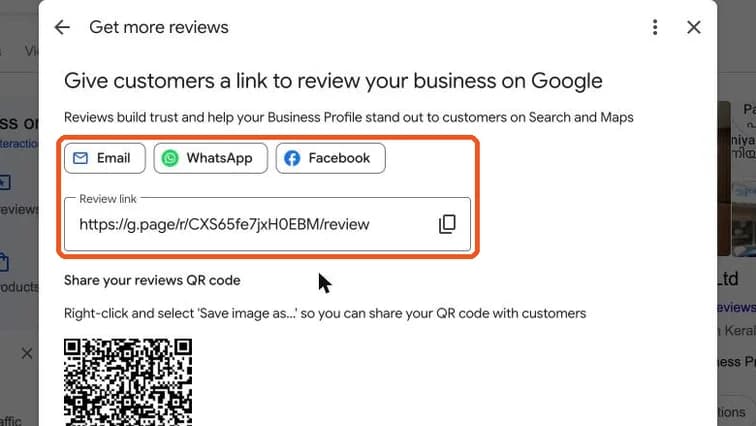
Get more reviews panel with WhatsApp share button and the review link highlighted. Real screenshot, Oct 2026. - 2
The same panel shows a review QR code. Save the image (right-click on a laptop, long-press on a phone) and print it for the reception, bills or certificates.
Stage 2
Ask every customer
- 1
Send a short message soon after a good experience, e.g. on WhatsApp:
- “Thank you for joining our workshop, Anu! If it helped, could you share a quick review? It really helps us: [link]”
- 2
Ask everyone, not just the people you think are happy.
Watch out
Google’s policy bans paying for reviews, offering discounts or gifts for them, writing fake ones, or filtering out unhappy customers (“review gating”). Profiles that do this can lose reviews or get restricted.
- 3
Make it a daily habit: one person checks that every customer from the day got the link.
Stage 3
Reply to every review
- 1
Click “Read reviews” → “Reply to reviews”. Use the Unreplied tab so nothing is missed. Reply within 48 hours, use the customer’s name and mention what they liked.
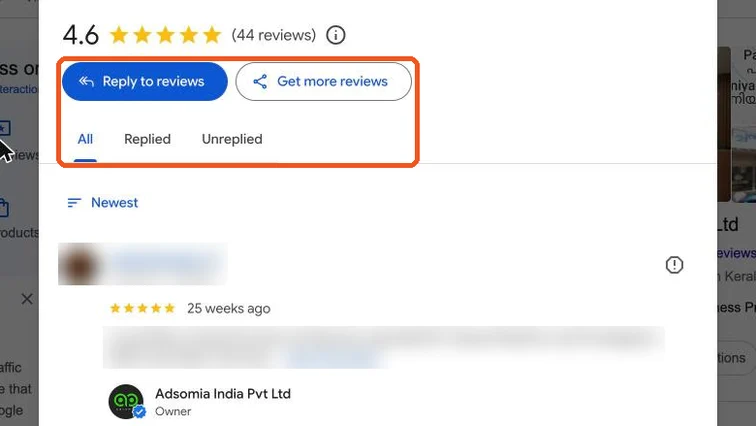
Reviews panel with Reply to reviews button and the All, Replied and Unreplied tabs highlighted; reviewer details blurred. Real screenshot, Oct 2026. - 2
Negative review:
- Thank them and apologise for the experience, without arguing.
- Offer to fix it offline: “Please call us on … so we can sort this out.”
- Never share private details about the customer.
- 3
Fake or abusive review? Flag it as inappropriate in Google. Replying politely still helps readers see you’re professional.
Practice & check
Now do it for real
Reading is not doing. Open your own account and complete this task before you move on.
Practice task (5 min)
Write a WhatsApp review request, a reply to a 5-star review and a reply to a 1-star complaint for a business you know.
Prove it
Two questions. Get both right and this SOP is done.
Common questions
Can I delete a bad Google review?
No. You can only flag reviews that break Google’s policies (fake, spam, offensive). Reply politely to genuine negative reviews.
How many Google reviews does a business need?
There’s no magic number. Aim for a steady flow of recent reviews and compare with the top local competitors in your category.
Done. That’s a real skill, not a certificate.
Next: SOP 204 — Publish Posts on a Google Business Profile →
Want to do this on real client budgets, with a mentor checking your work? That’s Level 2 at Unlearn. See the Digital Marketing track