The short answer
To create a Google Business Profile, go to google.com/business, sign in with the business’s Google account and click Manage now. Enter the real business name, primary category, address (or service area), phone and website. Then verify: most new profiles are asked for a short video recorded in the Google Maps app, though some get phone, SMS or email options.
Before you start
By the end of this SOP
A verified profile that shows on Google Search and Maps and that you can edit.
- Time
- 20–30 minutes, plus verification review (often a few days)
- You’ll need
- A Google account the business owns, the real business address or service area, and access to the premises (for video verification).
- Who does this
- The business owner, or the marketer with owner permission.
About this SOP: why it matters, where and when
Why it matters: People search “near me” and call straight from Maps. No profile means no place in those results.
Where: On google.com/business, Google Search and the Google Maps app.
When: Once per business location, before any local SEO or ads work.
Stage 1
Check before you create
- 1
Search the business name and town on Google Maps. If a profile already exists, click “Claim this business” or “Own this business?” instead of creating a new one.
- 2
Use a Google account the business owns (e.g. a shared business Gmail), not a staff member’s personal account.
Watch out
Duplicate profiles split reviews and can get both suspended. Always check first.
Stage 2
Create the profile
- 1
Go to google.com/business and click “Manage now”. Sign in with the business account.
- Already manage other profiles (e.g. at an agency)? In Business Profile Manager, click Add business → Add single business.
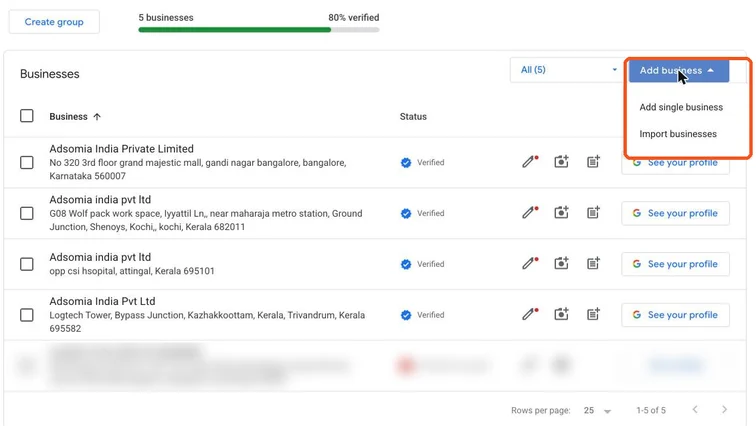
Google Business Profile Manager with the Add business menu open, showing Add single business. Real screenshot, Oct 2026. - 2
Business name: exactly as it appears on the signboard and documents. Then pick the business category.
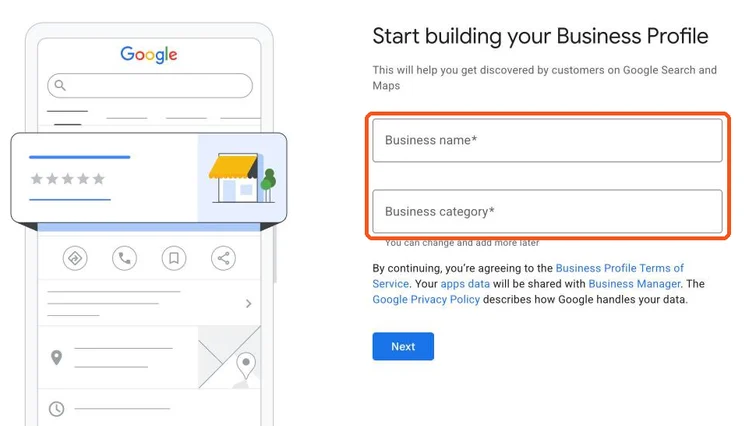
Start building your Business Profile form with Business name and Business category fields highlighted. Real screenshot, Oct 2026. Watch out
Don’t add keywords or locations to the name (e.g. “Best Digital Marketing Course Kochi”). It breaks Google’s guidelines and can get the profile suspended.
- 3
Primary category: the most specific one that describes what you are (e.g. “Dental clinic”, not “Health”). You can add more categories later.
- 4
Location:
- Customers visit you (shop, clinic, institute): add the full address and place the pin correctly.
- You visit customers (plumber, home tutor, event planner): choose a service area and hide the address.
- 5
Add the phone number customers should call and the website URL. Finish the setup steps.
Stage 3
Verify the profile
- 1
Google shows the verification methods available for your business. Choose one; you can’t pick a method that isn’t offered.
- 2
Video verification (most common): record in the Google Maps app, signed in to the same account, in one continuous take:
- Start outside: street, nearby landmarks, and the signboard with the business name.
- Show you can access the business: unlocking the door or shutter, the counter, equipment.
- Show proof you manage it: e.g. the billing system, tools or stock.
Tip
Use a steady internet connection and avoid filming customers’ faces or private documents.
- 3
Phone, SMS or email (if offered): enter the code Google sends.
- 4
Wait for review. It often takes a few business days. Don’t edit the name, address or category while verification is pending.
Practice & check
Now do it for real
Reading is not doing. Open your own account and complete this task before you move on.
Practice task (5 min)
Find a local business near you without a profile (or with an unclaimed one). Write down the exact name, best primary category and whether it should show an address or a service area.
Prove it
Two questions. Get both right and this SOP is done.
Common questions
Is Google Business Profile free?
Yes. Creating and managing a Google Business Profile is free.
How long does Google Business Profile verification take?
Video and other reviews often take a few business days, sometimes longer. Avoid editing key details while it’s pending.
Can I verify without a shop?
Yes, as a service-area business. You still need a real address for verification, but you can hide it from customers.
Done. That’s a real skill, not a certificate.
Next: SOP 202 — Optimise a Google Business Profile →
Want to do this on real client budgets, with a mentor checking your work? That’s Level 2 at Unlearn. See the Digital Marketing track