The short answer
To get and track calls from Google Ads, add a call asset with your business number to Search campaigns, or create call ads that show only a phone number. Then create call conversion actions: calls from ads (counted when the call lasts longer than a length you set, such as 60 seconds) and clicks on the phone number on your website. Where available, Google forwarding numbers report call length and caller area.
Before you start
By the end of this SOP
Call assets or call ads live, with call conversions tracking real calls.
- Time
- 30–45 minutes
- You’ll need
- A Google Ads account, a phone number answered in business hours, and GTM on your website (SOP 004).
- Who does this
- The Google Ads specialist.
About this SOP: why it matters, where and when
Why it matters: If calls aren’t tracked, Smart Bidding can’t see your best leads and cuts the keywords that bring them.
Where: Google Ads → Assets, Goals → Conversions, and Google Tag Manager.
When: For any business where customers prefer to call.
Stage 1
Add a call asset
- 1
Campaigns → Assets → + → Call. Enter your number and choose campaign or account level.
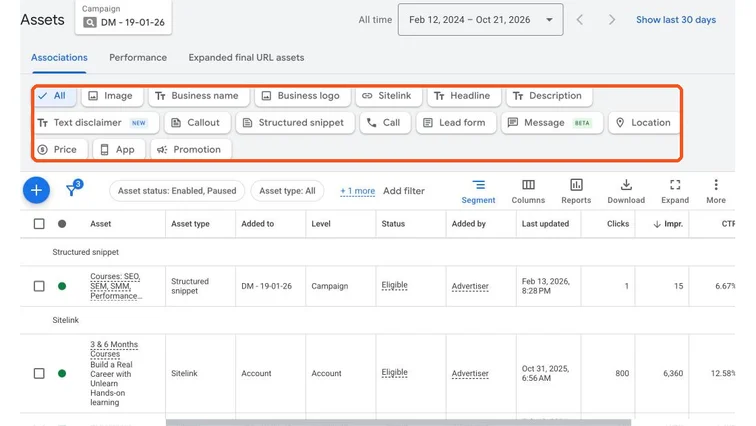
Google Ads assets view. Real screenshot, Oct 2026. - 2
Set an asset schedule for your business hours so the number only shows when someone can answer.
- 3
Turn on call reporting if offered in your account settings.
Stage 2
Create call conversion actions
- 1
Goals → Conversions → New conversion action → Phone calls → Calls from ads using call assets or call ads. Set call length to 60 seconds (or what a real enquiry takes).
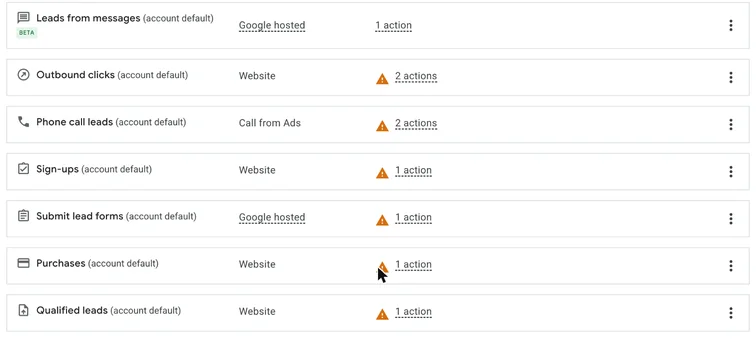
Google Ads conversion goals including Phone call leads from Call from Ads. Real screenshot, Oct 2026. - 2
Add a second action: Clicks on your number on your mobile website, or set up a GTM trigger for clicks on tel: links, the same way as WhatsApp clicks (SOP 308).
- 3
Set calls from ads as Primary. Keep website number clicks Secondary unless you can confirm most become calls.
Stage 3
Consider call ads
- 1
In a Search campaign, create a call ad: business name, number, two headlines and descriptions. On mobile, a tap calls you directly.
- 2
Use call ads only when you can answer quickly in business hours; schedule them for those hours.
Stage 4
Track call quality
- 1
Log every ad call in your CRM with the date, time and outcome (enquiry, booking, spam).
- 2
Compare reported call conversions with real bookings weekly; adjust the minimum call length if many short calls are counted.
- 3
For advanced setups, use a call-tracking provider that imports qualified calls back into Google Ads.
Practice & check
Now do it for real
Reading is not doing. Open your own account and complete this task before you move on.
Practice task (5 min)
Choose the right call length for three businesses (a clinic, a plumber, a course provider) and explain why.
Prove it
Two questions. Get both right and this SOP is done.
Common questions
What is the difference between call assets and call ads?
Call assets add a phone number to normal Search ads; call ads are ads designed to make people call instead of visiting your site.
Can I track calls from my website in Google Ads?
Yes, by tracking clicks on tel: links with the Google tag or GTM, or with a call-tracking provider.
Why don’t my call conversions show?
Check that the call length setting isn’t too long, the action is Primary, and calls come from ad clicks within the conversion window.
Done. That’s a real skill, not a certificate.
Next: SOP 344 — Set Up Automated Rules and Alerts in Google Ads →
Want to do this on real client budgets, with a mentor checking your work? That’s Level 2 at Unlearn. See the Digital Marketing track