The short answer
Automated rules in Google Ads (Tools → Bulk actions → Rules) check your account on a schedule and pause, change or email you when conditions are met. Start with alert-only rules: daily spend above budget, keywords with spend but no conversions, zero conversions in 3 days, disapproved ads and paused-by-error campaigns. Only let rules change bids or pause items once you trust them.
Before you start
By the end of this SOP
Six rules running that email you about overspend, wasted keywords, tracking drops and disapprovals.
- Time
- 30 minutes
- You’ll need
- Admin or Standard access to the Google Ads account.
- Who does this
- The Google Ads specialist or account manager.
About this SOP: why it matters, where and when
Why it matters: Problems like broken tracking or a runaway keyword can waste days of budget before anyone notices.
Where: Google Ads → Tools → Bulk actions → Rules.
When: When you take over or launch an account, and when you manage several accounts.
Stage 1
Create alert rules
- 1
Tools → Bulk actions → Rules → + → choose the level (campaigns, keywords, ads) and the action “Send email to account owners” or label.
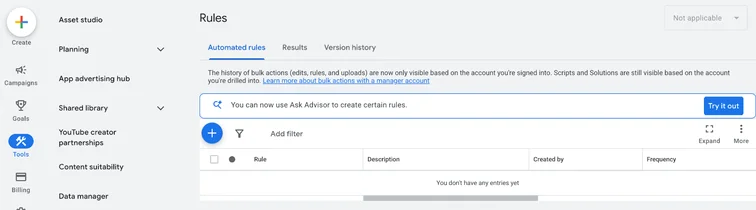
Google Ads Automated rules page under Tools, Bulk actions. Real screenshot, Oct 2026. - 2
Rule 1 – Overspend: campaigns where Cost (today) > 1.3 × daily budget, run hourly, email.
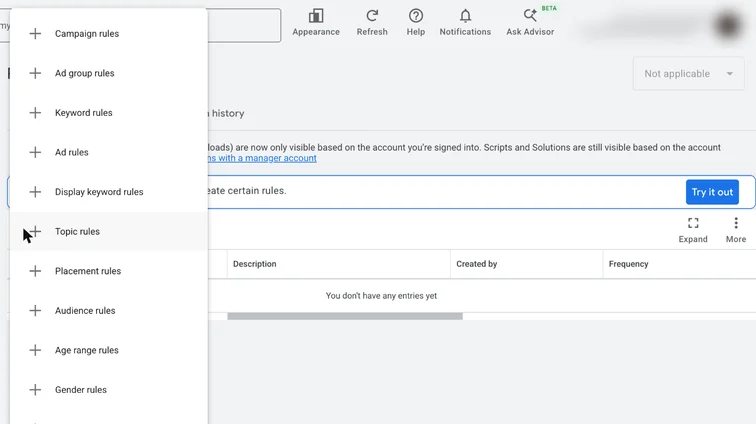
Google Ads new rule menu with campaign, ad group, keyword and ad rules. Real screenshot, Oct 2026. - 3
Rule 2 – Tracking drop: account or campaigns with Conversions (last 3 days) = 0 and Cost > your normal 3-day spend × 0.5, run daily.
- 4
Rule 3 – Wasted keywords: keywords with Cost (last 30 days) > 2 × target CPA and Conversions = 0, run weekly, label “Review”.
Stage 2
Add policy and quality alerts
- 1
Rule 4 – Disapproved ads: ads where Approval status = Disapproved, run daily, email.
- 2
Rule 5 – CTR drop: campaigns where CTR (last 7 days) is below half the previous 30-day CTR, weekly email.
- 3
Rule 6 – Budget pacing: on the 20th of the month, email campaigns where month-to-date cost is above 75% of monthly budget.
Stage 3
Use Google’s built-in alerts
- 1
Turn on email notifications for billing, policy and performance in Settings → Notification preferences.
- 2
Check the Diagnostics and Recommendations pages weekly; don’t auto-apply recommendations without review.
Stage 4
Review and graduate rules
- 1
Check Rules → History monthly to see what fired and whether it was useful.
- 2
Once an alert has been reliable for a month, you can switch it to an action (for example pause keywords with high spend and no conversions).
- 3
Agencies managing many accounts can move these to Google Ads scripts in the manager account for one setup across all clients.
Practice & check
Now do it for real
Reading is not doing. Open your own account and complete this task before you move on.
Practice task (5 min)
Write the conditions for a rule that alerts you when any campaign spends more than ₹2,000 in a day with no conversions.
Prove it
Two questions. Get both right and this SOP is done.
Common questions
Where are automated rules in Google Ads?
Tools → Bulk actions → Rules.
Are Google Ads scripts better than rules?
Scripts are more flexible and work across accounts, but need some JavaScript. Rules are enough for most single accounts.
Should I auto-apply Google’s recommendations?
No. Review each one; many raise budgets or broaden targeting.
Done. That’s a real skill, not a certificate.
Next: SOP 306 — Audit a Google Ads Account and Write a Fix-First Plan →
Want to do this on real client budgets, with a mentor checking your work? That’s Level 2 at Unlearn. See the Digital Marketing track