The short answer
To take over a Google Ads account, first confirm the client owns it (their email as admin, their billing), then request access by linking it to your manager account. Record a 90-day baseline of spend, conversions and CPA before touching anything, audit conversion tracking and settings, and make changes gradually over 30 days so you don’t reset learning or lose what was working.
Before you start
By the end of this SOP
Access confirmed, ownership protected, baseline recorded, audit done and a 30-day change plan agreed with the client.
- Time
- 2–3 hours over the first week
- You’ll need
- Your Google Ads manager account (MCC), the client’s customer ID, and the client available to approve access.
- Who does this
- The account manager and Google Ads specialist.
About this SOP: why it matters, where and when
Why it matters: Clients often don’t own their own account, and hurried changes in week one cause the results drop that makes them regret switching.
Where: Google Ads manager account, the client account, and a shared handover document.
When: Whenever you start work on a client’s existing account.
Stage 1
Protect ownership and access
- 1
Ask the client to check Admin → Access and security: at least one of the client’s own emails should be an Admin.
- 2
If the old agency owns the account or billing, ask the client to request admin access from them before anything else.
- 3
From your manager account, send a link request to the client’s customer ID (Accounts → + → Link existing account). The client accepts it in Admin → Access and security → Managers.
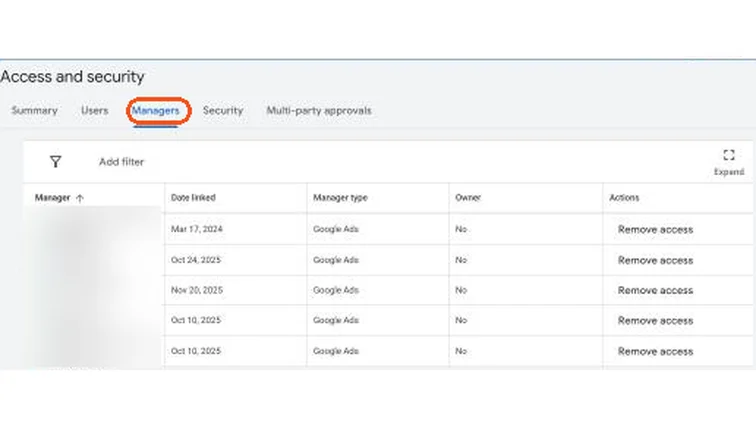
Google Ads Access and security, Managers tab listing linked manager accounts. Real screenshot, Oct 2026. - 4
Confirm billing is in the client’s name with a valid GST number, so invoices are correct (SOP 014).
Stage 2
Record the baseline
- 1
- 2
Ask the client for real leads or sales from the CRM for the same period. Calculate real cost per lead (spend × 1.18 ÷ real leads).
- 3
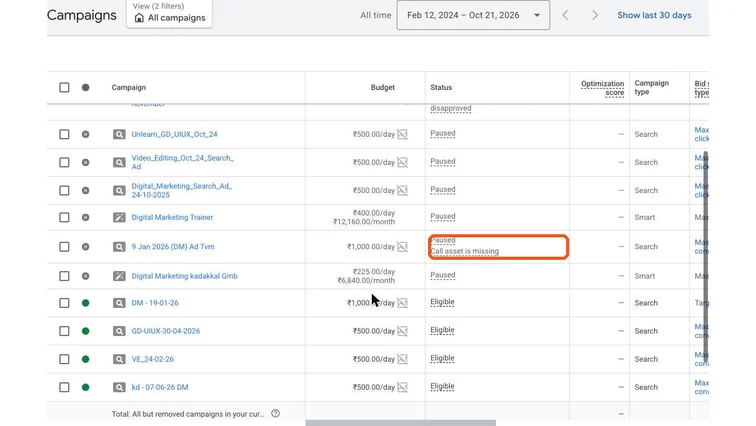
Save screenshots of key settings and the change history. This protects you if results were already falling.
Stage 3
Audit before changing
- 1
Run the full account audit (SOP 306): tracking first, then settings, structure, search terms, ads and landing pages.
- 2
Check for old agency tags or scripts on the website that may stop working when they lose access.
- 3
Note what is working: campaigns with good real CPA should be left alone at first.
Stage 4
Change slowly for 30 days
- 1
Week 1: fix tracking errors and obvious waste (Display Network on Search, irrelevant search terms).
- 2
Weeks 2–4: improve ads, assets and landing pages; restructure only what clearly needs it. Avoid changing bid strategy and budget at the same time.
- 3
Keep a dated change log and review results weekly with the client against the baseline.
- 4
Agree with the client what happens to access if the engagement ends: you remove yourself and they stay admin.
Tip
Writing this into the proposal (SOP 038) builds trust from day one.
Practice & check
Now do it for real
Reading is not doing. Open your own account and complete this task before you move on.
Practice task (5 min)
Write a handover checklist and 30-day change plan for a sample client switching agencies, including the baseline table.
Prove it
Two questions. Get both right and this SOP is done.
Common questions
How do I get access to a client’s Google Ads account?
Send a link request from your manager account to the client’s customer ID. The client approves it in Admin → Access and security → Managers.
What if the old agency won’t give the account back?
If the client was never an admin, they may need to start a new account. Ask Google Ads support for help; meanwhile, keep the new account’s ownership with the client from day one.
Why do results often drop after a takeover?
Many changes at once reset Smart Bidding learning, and tracking sometimes breaks when the old agency’s access is removed. Change slowly and check tracking first.
Done. That’s a real skill, not a certificate.
Want to do this on real client budgets, with a mentor checking your work? That’s Level 2 at Unlearn. See the Digital Marketing track