The short answer
To create a Performance Max campaign, first make sure conversion tracking records real leads or sales. Then create a new campaign with the Sales or Leads goal, choose Performance Max, set a budget and bid strategy, and build one asset group per product or service theme with images, videos, headlines and an audience signal. Add brand exclusions and negative keywords, and check channel, search term and asset reports every week.
Before you start
By the end of this SOP
A live Performance Max campaign with clean conversion goals, themed asset groups, audience signals and guardrails.
- Time
- 60–90 minutes
- You’ll need
- A Google Ads account with working conversion tracking (SOP 025), brand images, at least one video, and a monthly budget.
- Who does this
- The Google Ads specialist.
About this SOP: why it matters, where and when
Why it matters: Performance Max can find conversions across all of Google’s inventory, but without guardrails it can spend on brand searches and low-quality placements.
Where: Google Ads (ads.google.com) → Campaigns → New campaign.
When: After Search campaigns have steady conversions, or for e-commerce with a Merchant Center feed.
Stage 1
Check the foundations
- 1
Goals → Conversions: only real leads, calls or purchases should be Primary. Micro-actions like page views must be Secondary.
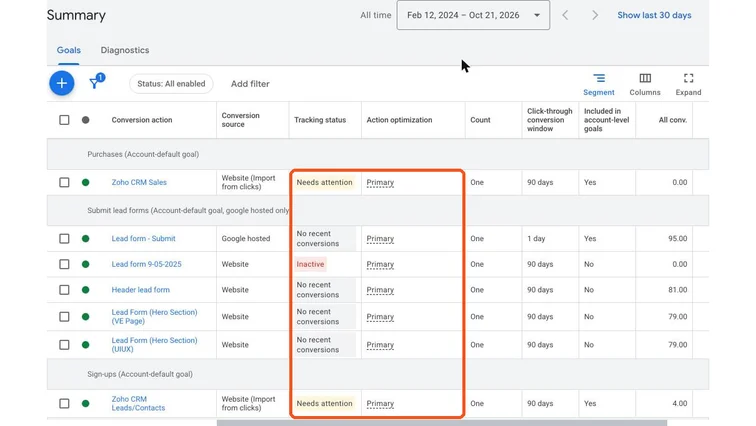
Google Ads conversion actions summary. Real screenshot, Oct 2026. - 2
- 3
Decide the budget: as a starting rule, enough for at least 30 conversions a month at your target cost per result.
Stage 2
Create the campaign
- 1
Campaigns → New campaign → choose the Sales or Leads objective → Performance Max.
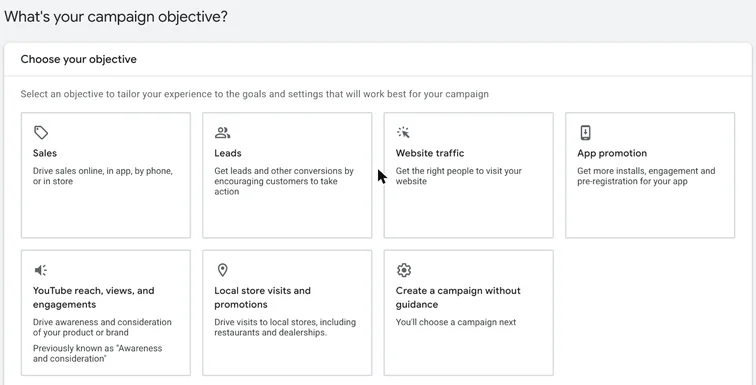
Google Ads campaign objective choices: Sales, Leads, Website traffic and more. Real screenshot, Oct 2026. - 2
- 3
Locations: your service area, with location options set to Presence (people in or regularly in your locations).
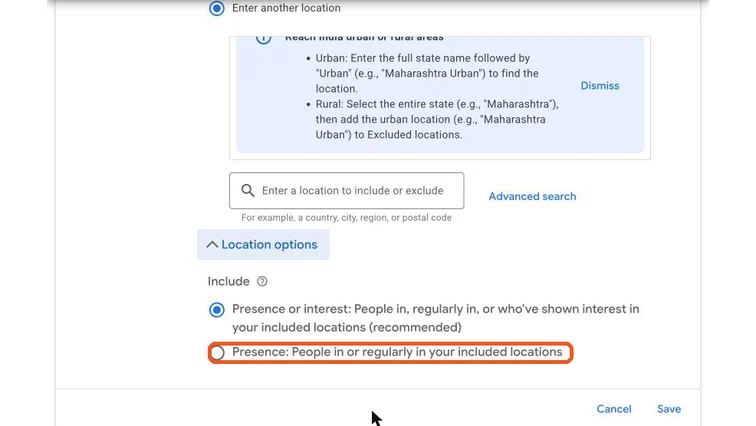
Google Ads location options with Presence selected. Real screenshot, Oct 2026. - 4
Turn off Final URL expansion for lead businesses, or add URL exclusions for pages like careers, blog and privacy.
Watch out
With URL expansion on, Google can send traffic to any page on your site, including job and blog pages that never convert.
Stage 3
Build asset groups
- 1
Create one asset group per theme (for example one per course or product category), each with its own final URL.
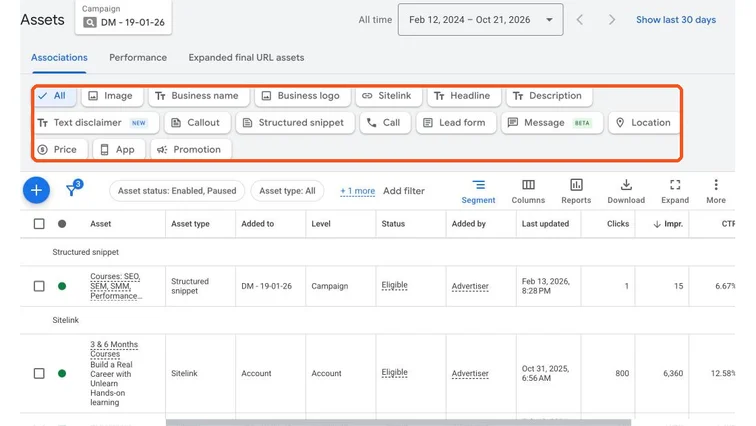
Google Ads assets view. Real screenshot, Oct 2026. - 2
Add up to 15 headlines, 5 long headlines, 5 descriptions, square, landscape and portrait images, your logo and at least one vertical and one horizontal video. If you add no video, Google may auto-create one, which is usually poor.
- 3
Add an audience signal: your customer list, website visitors and custom segments built from search terms that buyers use. Signals guide the start; Google can go beyond them.
- 4
Aim for Ad strength “Good” or “Excellent” by filling every asset type with distinct messages.
Stage 4
Add guardrails and review weekly
- 1
Add a brand exclusion so your own brand searches stay in your brand Search campaign.
- 2
Add negative keywords: free, jobs, salary, course PDF and other irrelevant terms (SOP 305).
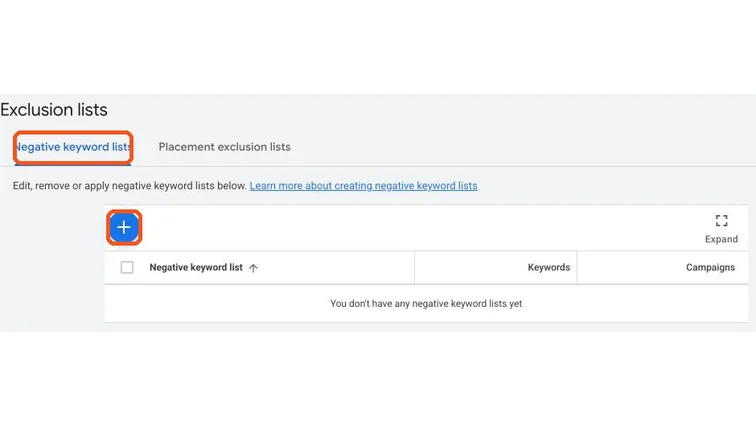
Google Ads negative keyword lists. Real screenshot, Oct 2026. - 3
Weekly: check Insights → search terms, the channel performance report and the asset report. Replace low-performing assets after 2–3 weeks.
- 4
Don’t change budget by more than 20% at a time or edit settings daily; give the campaign 2–3 weeks to learn.
Practice & check
Now do it for real
Reading is not doing. Open your own account and complete this task before you move on.
Practice task (5 min)
Plan a Performance Max campaign for a local course provider: list two asset groups, their final URLs, 5 headlines each, an audience signal and 10 negative keywords.
Prove it
Two questions. Get both right and this SOP is done.
Common questions
Is Performance Max good for lead generation?
It can be, with qualified-lead conversion imports, URL exclusions and negative keywords. Without them it often brings low-quality leads.
How long does Performance Max take to learn?
Usually 2–4 weeks. Avoid big changes during that time.
Can I add negative keywords to Performance Max?
Yes. Campaign-level negative keywords are now supported, alongside brand exclusions and account-level negatives.
Done. That’s a real skill, not a certificate.
Next: SOP 342 — Create YouTube Ads With a Demand Gen Campaign →
Want to do this on real client budgets, with a mentor checking your work? That’s Level 2 at Unlearn. See the Digital Marketing track