The short answer
To track keyword rankings, choose 20–50 priority keywords mapped to the pages that should rank, then track them for the right city and on mobile. Search Console’s average position is free and shows real data; a rank tracker such as Semrush Position Tracking or Ahrefs Rank Tracker adds daily positions, competitors and SERP features. Review weekly trends and report monthly, alongside clicks and leads.
Before you start
By the end of this SOP
A tracked list of priority keywords by page, city and device, reviewed weekly and reported monthly.
- Time
- 30–45 minutes to set up, 10 minutes a week
- You’ll need
- Search Console access (SOP 206) and optionally a rank tracker (Semrush, Ahrefs or similar).
- Who does this
- The SEO specialist.
About this SOP: why it matters, where and when
Why it matters: Rank changes show whether SEO work is moving before clicks and leads catch up, and warn you early about drops.
Where: Google Search Console, a Google Sheet, and a rank tracking tool.
When: At the start of an SEO project, then weekly.
Stage 1
Choose the keywords
Stage 2
Track for free with Search Console
- 1
In Search Console → Performance, add a query filter for each priority keyword (or use “Custom (regex)” to match several).
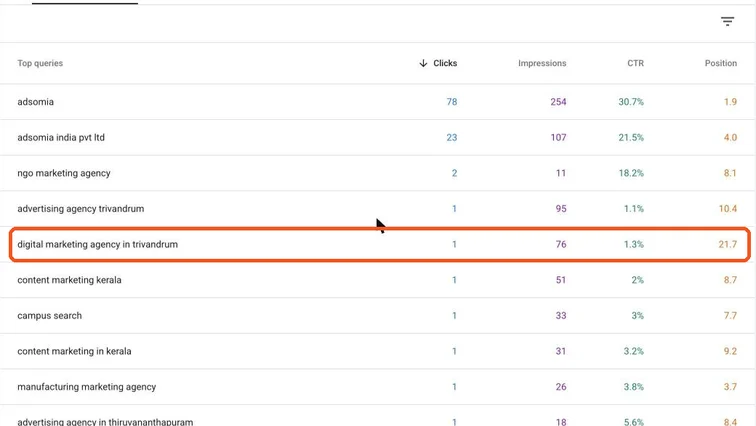
Search Console Performance report with queries. Real screenshot, Oct 2026. - 2
Turn on Average position and compare the last 28 days with the previous period.
- 3
Copy weekly numbers into a Google Sheet: keyword, clicks, impressions, average position.
- 4
Remember: average position blends all locations and devices where you appeared.
Note
A keyword at average position 8 might be 3 in Kochi and 25 elsewhere. That’s why local businesses add a rank tracker.
Stage 3
Add a rank tracker for daily, local data
- 1
In your tool (for example Semrush Position Tracking or Ahrefs Rank Tracker), create a project for the domain.
- 2
Set location to the city you target (Thiruvananthapuram, Kochi), device to mobile, and search engine to Google India.
- 3
Add the keywords with their tags and 3–5 competitor domains.
- 4
Turn on SERP feature tracking so you see when an AI Overview, local pack or snippet appears.
Stage 4
Review and report
- 1
Weekly: look for keywords that dropped more than 5 positions and check what changed (page edits, competitors, Google updates).
- 2
Monthly: report visibility trend and the number of keywords in the top 3 and top 10, next to clicks and leads (SOP 321).
- 3
Don’t react to daily wobbles; rankings move every day. Act on trends of 2+ weeks.
Practice & check
Now do it for real
Reading is not doing. Open your own account and complete this task before you move on.
Practice task (5 min)
Pick 20 keywords for a local business, map each to a page, and build the Search Console regex filter and tracking sheet.
Prove it
Two questions. Get both right and this SOP is done.
Common questions
Can I track keyword rankings for free?
Yes, with Search Console’s average position and a weekly sheet. It’s real data, but not city-specific or daily.
How many keywords should I track?
20–50 priority keywords is enough for most small businesses. More keywords add noise without better decisions.
Why do my rankings change every day?
Google tests results, personalises them and updates constantly. Look at weekly and monthly trends.
Done. That’s a real skill, not a certificate.
Next: SOP 334 — Run a Full Technical SEO Site Audit and Prioritise Fixes →
Want to do this on real client budgets, with a mentor checking your work? That’s Level 2 at Unlearn. See the Digital Marketing track