The short answer
To do keyword research for free, start with Google itself: type your service and read the autocomplete suggestions, then check People also ask and related searches. Add the queries you already get impressions for in Search Console, and check rough volumes in Google Keyword Planner. Group the keywords by intent, and give each group one page.
Before you start
By the end of this SOP
A grouped keyword list with one main keyword per page and the questions each page must answer.
- Time
- 45–60 minutes
- You’ll need
- A browser, Google Sheets, and ideally Search Console (SOP 206) and a Google Ads account for Keyword Planner.
- Who does this
- The person responsible for SEO or content.
About this SOP: why it matters, where and when
Why it matters: Writing about what people actually search for is the difference between a page that gets found and one that doesn’t.
Where: Google Search, Search Console, Google Keyword Planner and a Google Sheet.
When: Before writing any new page, and when planning a content calendar.
Stage 1
Collect ideas from Google
Use an incognito window so your own history doesn’t change the suggestions.
- 1
Type your main service and stop before the end, e.g. “digital marketing course in ”. Write down every suggestion.
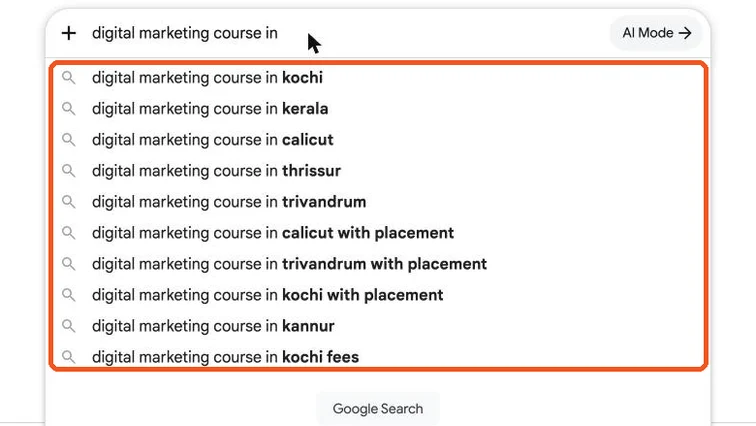
Google autocomplete suggestions for digital marketing course in, showing Kochi, Kerala, Calicut, Trivandrum, with placement and fees. Real screenshot, Oct 2026. Tip
Notice the patterns: cities, “with placement”, “fees”. Each is a different need, and may deserve its own page or section.
- 2
Search the main keyword and open “People also ask”. Each question is something your page should answer.
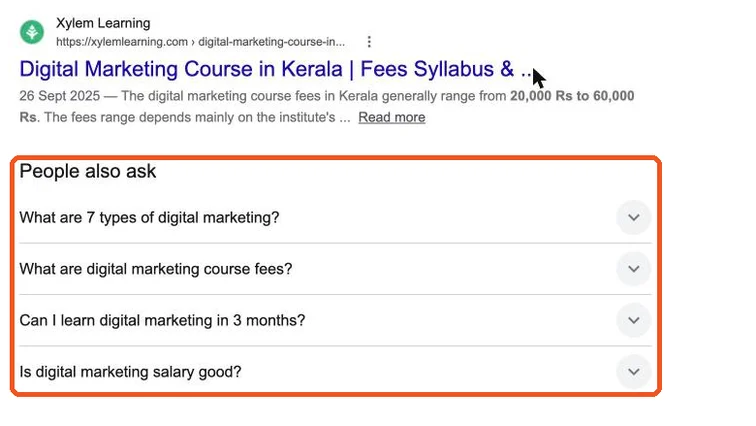
People also ask box with questions about digital marketing course fees, duration and salary. Real screenshot, Oct 2026. - 3
Scroll to the bottom for “People also search for” / related searches and add those too.
- 4
Try the alphabet trick: “digital marketing course a…”, “…b…”, and words like how, best, near me, fees, online.
Stage 2
Add real data
- 1
Search Console → Performance → Queries (SOP 210): these are searches you already show for. Add any that fit.
- 2
Google Keyword Planner (free with a Google Ads account): Tools → Keyword planner → Discover new keywords. Note the average monthly search range for each keyword.
Note
Without active ad spend, Keyword Planner shows ranges (e.g. 100–1K) rather than exact numbers. That’s enough to compare.
Stage 3
Group by intent
- 1
Label each keyword by intent:
- Know: wants information (“what is digital marketing”).
- Compare: weighing options (“best digital marketing course in kerala”).
- Do: ready to act (“digital marketing course in trivandrum with placement”).
- 2
Group keywords that need the same answer. Pick the clearest one as the main keyword; the rest are supporting phrases.
- 3
Map one group to one page. Two groups wanting different answers need two pages.
Watch out
Don’t make a separate page for every tiny variation (“course kochi” and “courses in kochi”). That creates thin, competing pages.
Practice & check
Now do it for real
Reading is not doing. Open your own account and complete this task before you move on.
Practice task (5 min)
Build a free keyword sheet for one local business: 30 ideas, labelled by intent, grouped into at least 5 pages.
Prove it
Two questions. Get both right and this SOP is done.
Common questions
Is Google Keyword Planner free?
Yes, with a Google Ads account. You don’t have to run ads, but volumes show as ranges unless you spend.
How many keywords should one page target?
One main keyword and its close variations. If keywords need different answers, they need different pages.
Done. That’s a real skill, not a certificate.
Next: SOP 213 — Write an SEO Content Brief →
Want to do this on real client budgets, with a mentor checking your work? That’s Level 2 at Unlearn. See the Digital Marketing track