The short answer
To use AI for an SEO content brief, do the research yourself first: target keyword, search intent, top-ranking pages and real customer questions. Then ask AI to organise the questions into an outline, suggest headings, FAQs and internal links, and list gaps versus competitors. The writer adds first-hand experience, local examples, data and expert review. AI should speed up the brief, not replace expertise.
Before you start
By the end of this SOP
A complete brief with intent, outline, questions, internal links and the experience the writer must add.
- Time
- 30–60 minutes per brief
- You’ll need
- An AI assistant, Search Console, a keyword tool, and access to the top results for your keyword.
- Who does this
- The SEO specialist or content lead.
About this SOP: why it matters, where and when
Why it matters: Good briefs make content rank and convert; AI cuts the time to build them.
Where: Google search, Search Console, your AI assistant and a Google Doc.
When: Before writing any new page or refreshing an old one.
Stage 1
Research the search
- 1
Search the keyword in an incognito window for your city. Note the result types (guides, service pages, videos, local pack) and People Also Ask questions.
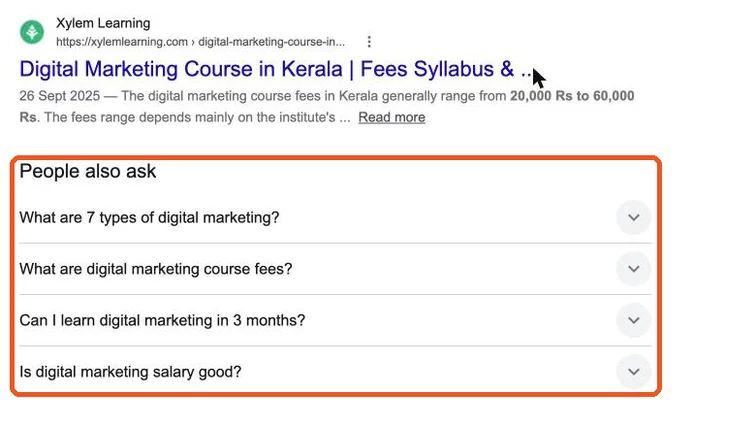
People Also Ask results in Google. Real screenshot, Oct 2026. - 2
Open the top 5 results; note what they cover and what they miss.
- 3
Pull related queries from Search Console and your keyword tool (SOP 212).
Stage 2
Let AI organise
- 1
Prompt: “Here are my keyword, intent, competitor headings and customer questions. Create an outline with H2s and H3s that answers the search intent better than these pages. Mark gaps competitors miss.”
- 2
Ask for a 40–60 word direct answer for the top of the page, and 5 FAQs with short answers.
- 3
Ask which of your existing pages to link to and from (paste your URL list).
Stage 3
Add what AI can’t
- 1
Add first-hand input: real examples, photos, prices, local details, mistakes you’ve seen, and data from your own work.
- 2
Name the expert who will review the content and add an author bio.
- 3
List schema to add (Article, FAQ, HowTo, Product) and the call to action.
Stage 4
Check before publishing
- 1
Fact-check every number and claim; AI can invent statistics and sources.
- 2
Read it aloud: remove filler and generic intros; make sure it answers the question in the first lines.
- 3
Ask: would a reader learn something they can’t get from the top 5 results? If not, add more original material.
Practice & check
Now do it for real
Reading is not doing. Open your own account and complete this task before you move on.
Practice task (5 min)
Create a brief for “digital marketing course in Kochi” using AI for the outline, then add 5 pieces of first-hand information the AI couldn’t know.
Prove it
Two questions. Get both right and this SOP is done.
Common questions
Does Google penalise AI content?
Google rewards helpful content however it is produced, but its spam policies target mass-produced pages with little value.
Can AI write the full article?
It can draft, but a person with real expertise should add experience, check facts and edit.
Which AI prompts work best for briefs?
Prompts that include your research: keyword, intent, competitor headings and customer questions.
Done. That’s a real skill, not a certificate.
Next: SOP 352 — Check AI-Written Content Before You Publish →
Want to do this on real client budgets, with a mentor checking your work? That’s Level 2 at Unlearn. See the Digital Marketing track