The short answer
To build a marketing dashboard in Data Studio (the new name for Looker Studio), create a blank report, add data sources with the free Google connectors for GA4, Google Ads, Search Console and Google Sheets, then build one summary page with date controls, scorecards for spend, leads, cost per lead and revenue, a trend chart and a channel table. Add Meta Ads data through a Google Sheet or a paid connector, and share view-only access with the client.
Before you start
By the end of this SOP
A one-page dashboard with spend, leads, cost per lead, channel breakdown and trends, shared with the client.
- Time
- 2–3 hours for the first version
- You’ll need
- Access to GA4, Google Ads and Search Console with the same Google account, plus a Google Sheet for CRM or Meta data.
- Who does this
- The analyst or account manager.
About this SOP: why it matters, where and when
Why it matters: Clients understand results faster in one dashboard than in five platform logins, and you save hours of manual reporting.
Where: Data Studio, formerly Looker Studio (lookerstudio.google.com redirects to it).
When: When onboarding a client, then reviewed monthly.
Stage 1
Plan the questions
- 1
Write the 3–5 questions the owner asks: How many leads? What did each cost? Which channel works? Is it better than last month?
- 2
Pick one metric for each: spend (with GST), leads or qualified leads from the CRM, cost per qualified lead, revenue, MER.
- 3
Decide the source of truth for leads and sales: your CRM, not ad platforms.
Stage 2
Connect data sources
- 1
Data Studio → Create → Report → add data: Google Analytics (choose the GA4 property), Google Ads, Search Console (Site impression).
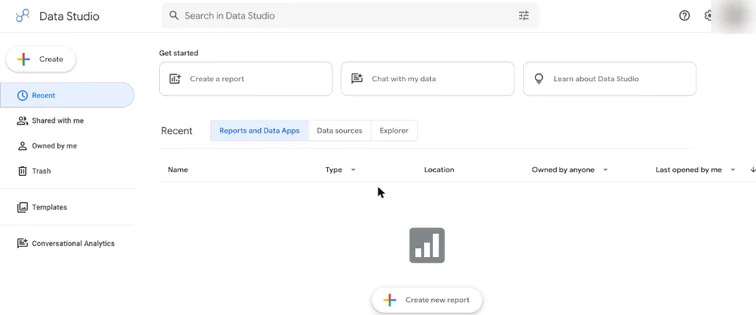
Data Studio home with Create a report. Real screenshot, Oct 2026. - 2
For Meta Ads and CRM data, export weekly into a Google Sheet with columns date, channel, spend, leads, qualified leads, sales, revenue, then connect the Sheet.
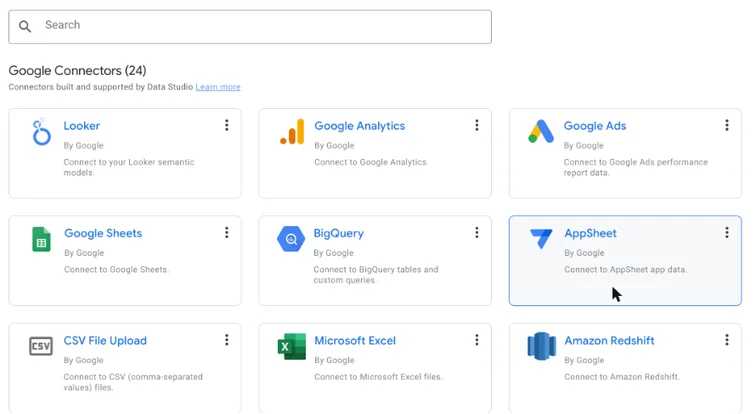
Data Studio Google connectors including Google Analytics, Google Ads and Google Sheets. Real screenshot, Oct 2026. - 3
Paid connectors (for example Supermetrics or Windsor.ai) can pull Meta Ads automatically if the budget allows.
Stage 3
Design the summary page
- 1
Top: a date range control (default last month, compare to previous period) and the client logo.
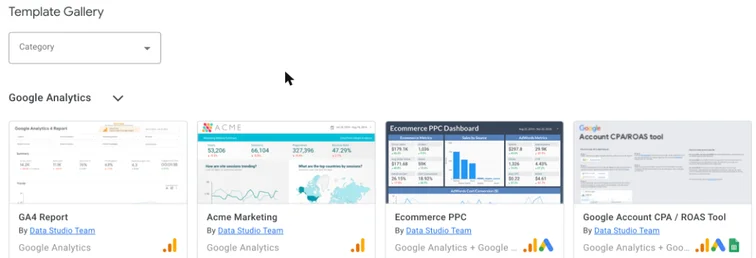
Data Studio template gallery with GA4 and Google Ads report templates. Real screenshot, Oct 2026. - 2
Row 1: scorecards for spend, qualified leads, cost per qualified lead and revenue, each with comparison.
- 3
Row 2: a time-series chart of leads and spend by week; a table of channels with spend, leads, cost per lead.
- 4
Row 3: top landing pages from GA4 with key events, and top Search Console queries.
- 5
Keep it to one page that fits a laptop screen; add detail pages only if asked.
Stage 4
Share and maintain
- 1
Share → invite the client as Viewer. Keep data source credentials on your account; don’t give edit access.
- 2
Add a text box explaining each metric in one line and the source.
- 3
Each month, compare dashboard numbers with the platforms and CRM before the report call (SOP 354).
Practice & check
Now do it for real
Reading is not doing. Open your own account and complete this task before you move on.
Practice task (5 min)
Sketch a one-page dashboard for a coaching centre on paper: the 4 scorecards, 1 chart and 2 tables you would include.
Prove it
Two questions. Get both right and this SOP is done.
Common questions
Is Looker Studio free?
Yes. Looker Studio, now renamed Data Studio, is free; the Pro version adds team management features.
Can Looker Studio connect to Meta Ads?
Not with a free Google connector. Use a Google Sheet or a paid third-party connector.
Why do numbers differ from GA4?
Date ranges, time zones, sampling and thresholding can cause differences; match the settings and data source.
Done. That’s a real skill, not a certificate.
Next: SOP 354 — Run a Monthly Client Reporting Call That Keeps Clients →
Want to do this on real client budgets, with a mentor checking your work? That’s Level 2 at Unlearn. See the Digital Marketing track